
Don't worry — almost everyone makes them. Here's how to fix each one.
The five mistakes, in one line each:
- Dumping the whole brief into one AI prompt
- A disorganized shared workspace
- Generating one SKU at a time instead of templating
- Stopping after the first output
- Writing a brief that's too short
The fix for all five: treat AI like a contractor, not a chat window.
I work with AI every single day. Building products, using the models hands-on — Claude, GPT-5, Gemini, Veo, Runway, Midjourney — and teaching ecommerce brands doing $5M–$500M GMV how to ship content with them at scale.
Even the brands doing this best keep running into the same handful of problems. I make them too. Sometimes I'm walking a brand through their workflow and realize I just did the exact same thing on a different project last week.
These aren't signs you're bad at AI. They're signs you're learning it — same as the rest of us. Below are the five mistakes I see most often, why they happen, and the small shifts that fix them.
Mistake 1: Dumping the whole brief into one AI prompt
You sit down to make 12 product shots for the spring collection. You type a paragraph describing what you need — the look, the model, the lighting, the brand vibe — hit enter, and wait. The output comes back, and it's… not quite right. Not on-brand. Not usable.
You probably tried again with a longer prompt. Got something similar. Started to wonder if AI is actually ready for real work.
What's happening: AI is being asked to make eight creative decisions at once, with no breakdown of which decisions matter most. The marketing of these tools encourages this ("type what you want, get what you need"). But that's not how creative work happens — even with a human, you'd brief them in layers.
The fix: Break the brief into pieces
- Mood board first
- Then shot list
- Then model selection
- Then output, one shot at a time
- Then iterate
It feels slower at first. It isn't. You get usable output on the second try instead of the twentieth.
Mistake 2: A messy AI workspace (and why it's invisible)
Five teams sharing one folder. Models named test_v3_final_FINAL. The social team's brand voice bleeding into the ecommerce team's product copy. Outputs that feel inconsistent across the catalog, and nobody can quite explain why.
This one is sneaky because it doesn't feel like a problem. AI tools look like a chat window, so people treat them like a chat — not a shared workspace. But the moment more than one person is generating content for more than one brand, you're running into the same governance issues you'd have in any shared Drive.
The AI isn't getting confused. Your inputs are.
The fix: Set up the workspace before you generate anything serious
- One folder per team
- A simple naming convention for models —
brand_persona_attribute - Brand-scoped memory, never shared across brands
- A clear owner for the model library
It takes 30 minutes. It saves you from a month of wondering why the outputs feel off.
Mistake 3: Generating one product at a time instead of templating
You nail the hero shot for one SKU. It looks great. You open a new chat. You start over for the next SKU. You repeat this 200 times. By SKU 30 you're tired, the brand is asking when it'll be done, and the work doesn't feel scalable anymore.
This one tripped me up for a while. AI conversations feel like one-offs, so it's natural to treat each generation as its own thing.
But that's not the point of AI. The point is: figure out the right prompt + reference + model combo once, then run it across hundreds of products.
The fix: When something works, templatize it
Whenever an output works, stop and turn it into a template. Codify the prompt. Save the references. Save the model. Run the next SKU through the same workflow instead of starting from scratch.
If you find yourself rewriting prompts between products, that's the signal. Templatize it.
Mistake 4: Stopping after the first AI output
The first output isn't quite right. You shrug, say "AI isn't there yet," and go back to the old workflow.
I've watched this happen at brands with full creative teams. And it makes total sense — when you compare AI's first output to a final asset from your last photoshoot, AI loses. But that's the wrong comparison.
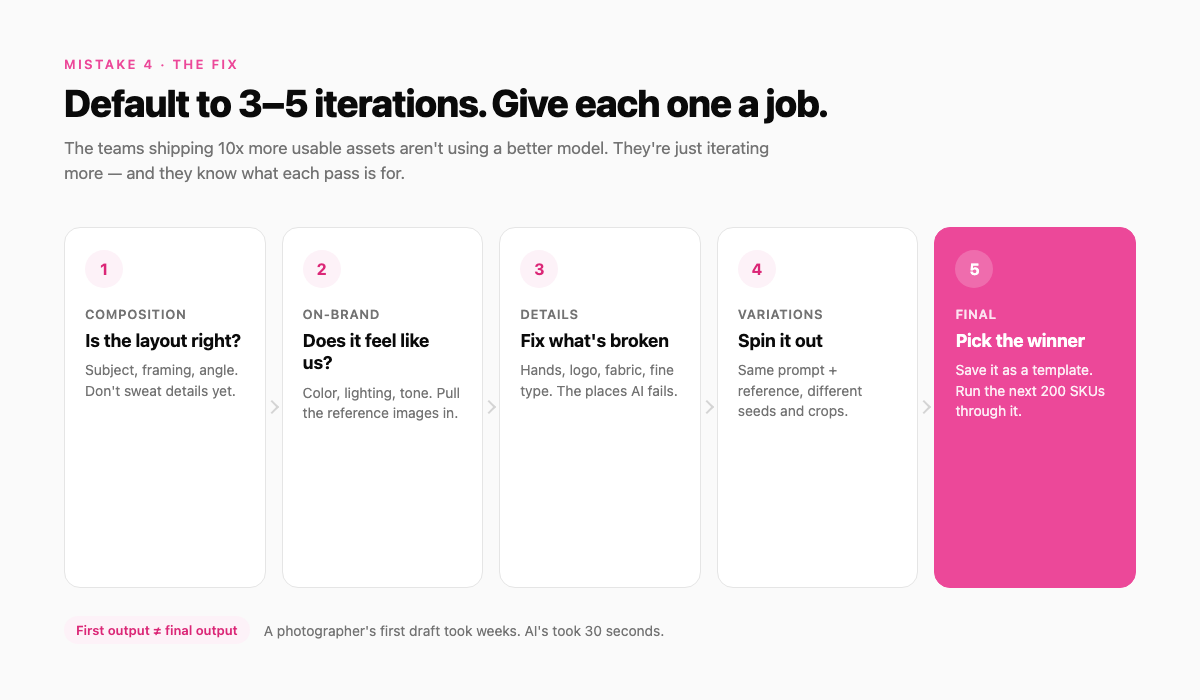
A photographer's "first output" took weeks. AI's first output took 30 seconds. You haven't seen the final yet. You've seen draft one.
The fix: Default to 3–5 iterations, and assign each one a job
- Iteration 1 — is the composition right?
- Iteration 2 — does it feel on-brand?
- Iteration 3 — fix the details (hands, logo, fabric)
- Iteration 4 — generate variations
- Iteration 5 — pick the final
The teams shipping 10x more usable assets aren't using a better model. They're just iterating more.
Mistake 5: Writing a brief that's too short
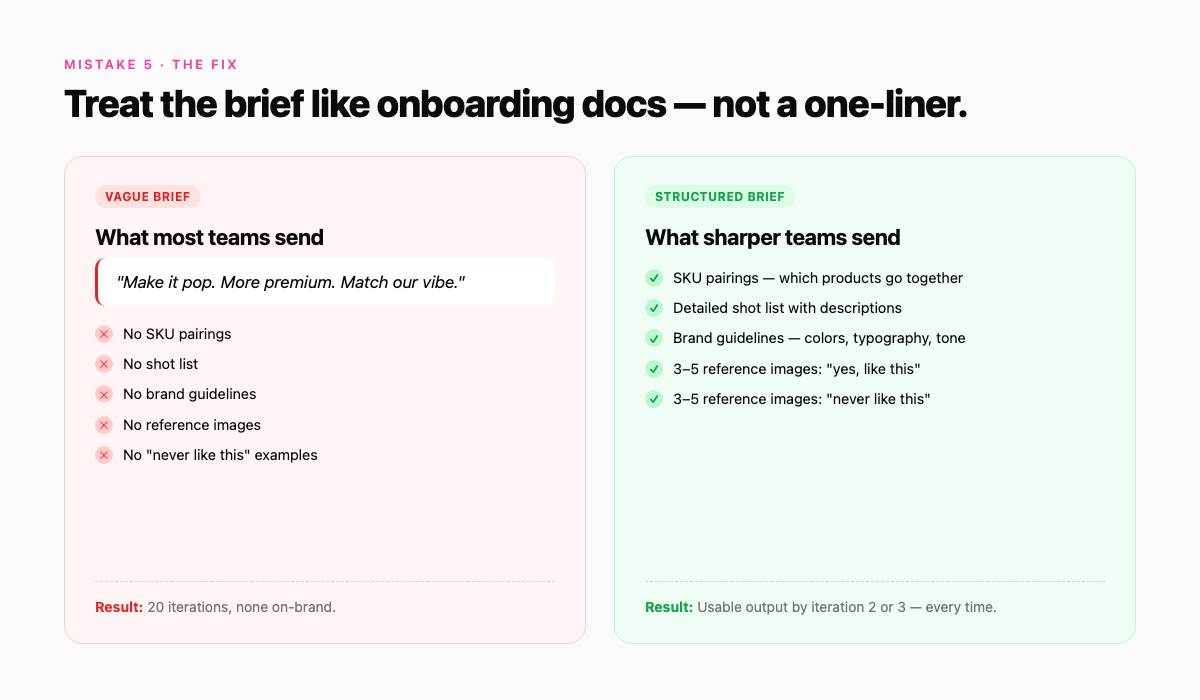
"Make it pop." "More premium." "Match our vibe." These are the briefs you'd give a teammate who already knows your brand inside and out. They make perfect sense to a person. They make no sense to an AI.
This is the most relatable mistake on the list. We've all done it. AI feels conversational, so we brief it conversationally — and then wonder why we got vibes back.
The fix: Treat the brief like onboarding documentation for a contractor who's never heard of your brand
- SKU pairings (which products go together)
- Detailed shot list with descriptions
- Brand guidelines — colors, typography, tone
- 3–5 reference images of "yes, like this"
- 3–5 reference images of "never like this"
It feels like overkill for a single image. It is. But you only build the brief assets once — every output after that gets sharper for free.
Why these mistakes share one root
These five mistakes all share one root: it's easy to assume AI will fill in the gaps your team usually fills in. It won't. AI doesn't replace judgment — it compounds it. Whatever taste, brief discipline, and process you bring to it, AI multiplies.
Bring sharpness, you get 10x leverage. Bring fuzziness, you get faster fuzziness.
The good news: every one of these mistakes has an easy fix, and none of them require a new tool. Just a small shift in how you set up the work.
Before scaling the workflow, make sure the team can protect product accuracy and shopper trust with a clear review process.
The shortcut: don't bolt this on yourself
Tolstoy is built around exactly these five fixes:
- Modular briefs that break the prompt into layers
- Brand-scoped workspaces so teams don't bleed into each other
- Templated workflows that let you run one prompt across 200 SKUs
- Built-in iteration so the first output is a draft, not a verdict
Stop briefing AI like a chat window. Start briefing it like a contractor — at scale.
Start free → · No credit card. Your first batch in under 10 minutes.
Create with Tolstoy
Put these ideas into practice
Turn your product ideas into AI images, videos, and shopping experiences.