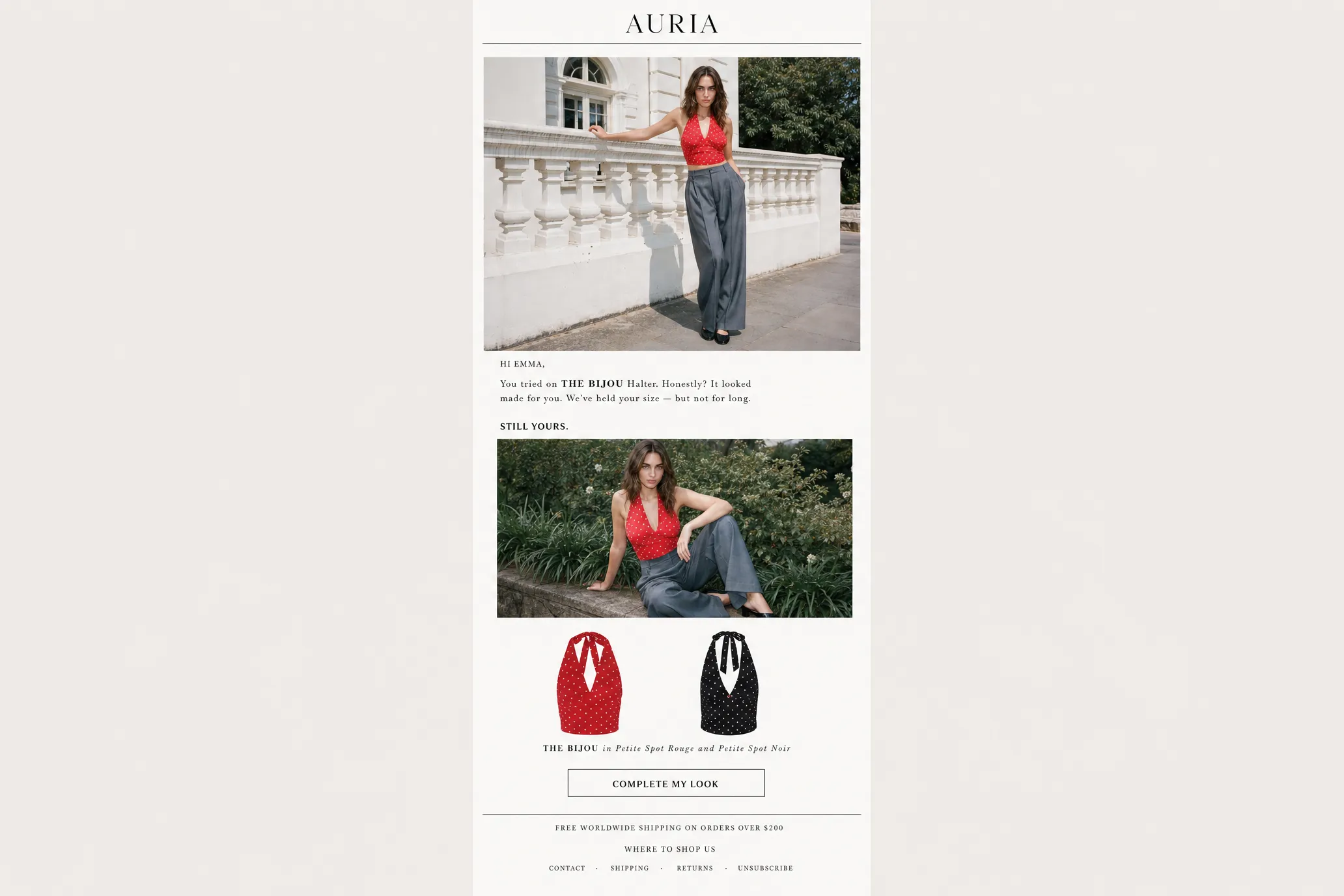
Quick answer: Tolstoy now turns try-ons into Klaviyo drafts
Tolstoy's new personalized try-on email workflow helps Shopify brands turn virtual try-on intent into reviewable Klaviyo campaign drafts. It builds on a proven onsite behavior: shoppers who try on a product are already showing fit confidence and purchase intent.
- New workflow: create personalized Klaviyo drafts from virtual try-on behavior.
- Best first campaigns: post-purchase upsell, abandoned checkout, and tried-on-but-did-not-purchase.
- Why now: CSB saw a 6.0% site-wide conversion lift after adding Tolstoy AI Sales Agent to PDPs in a 50/50 test.
- Keep control: the brand reviews the Klaviyo draft before sending.
Most ecommerce email personalization starts with what someone bought, browsed, abandoned, or might like next. That is useful, but for apparel, beauty, accessories, and fit-sensitive products, it often skips the question that stopped the shopper in the first place:
Will this look right on me?
A shopper who completes a virtual try-on has given the brand a stronger signal than a normal page view. They did not only browse. They imagined the product on themselves.
That signal already has measurable onsite impact. In Tolstoy's Crop Shop Boutique case study, CSB added AI Sales Agent to PDPs in a controlled 50/50 A/B test and saw a 6.0% site-wide conversion lift, translating to thousands of incremental orders.
Now Tolstoy is extending that same virtual try-on signal into email. The new personalized try-on email workflow creates reviewable Klaviyo campaign drafts from shopper try-on behavior, so brands can follow up with the product, image, or recommendation a shopper already showed intent around.
That is why virtual try-on belongs in lifecycle email. The email should not restart the conversation with a flat catalog image. It should continue the try-on moment with an image, product, or CTA that reflects what the shopper already did.
Why static recommendation emails miss fit intent
Product recommendation emails are usually built around purchase history, browse behavior, collections, or merchandising rules. Those are good signals, but they can still feel generic when the shopper's hesitation is about fit, style, shade, or how the product looks on them.
A static block can recommend the right category and still fail to answer the personal question. A virtual try-on follow-up can do something more specific: remind the shopper of the item they tried, show a relevant next product, or bring them back to a buying path that already had intent.
Klaviyo's post-purchase guidance and Shopify's lifecycle email examples show why segmentation and timing matter. The opportunity for fit-sensitive brands is to add one more signal: what the shopper wanted to see on themselves.
Three personalized try-on campaigns to start with
Do not start with ten flows. Start with the three moments where try-on intent naturally maps to a useful next email.
Post-purchase upsell
After a shopper buys, recommend a complementary product and show why it fits the look, routine, or set.
Abandoned checkout
Bring shoppers back to the item they already considered, with the try-on context still intact.
Tried on, no purchase
Re-engage shoppers who completed a try-on but never bought, while the fit signal is still fresh.
| Campaign type | Audience | Email job | Creative angle | What to measure |
|---|---|---|---|---|
| Post-purchase upsell | Shopper bought recently | Recommend a complementary product | Show a relevant product as a try-on or invite them to preview the next item | Clicks, revenue per recipient, follow-on purchase, unsubscribe rate |
| Abandoned checkout | Shopper started checkout but did not order | Bring them back to the product they already considered | Re-feature the item they tried or return them to the saved product path | Recovery rate, checkout completion, revenue per send |
| Tried on, no purchase | Shopper completed try-on but never bought | Re-engage high-intent shoppers | Remind them of the try-on and reduce the fit hesitation | Click rate, PDP return rate, purchase rate after click |
The reason these work as starting points is that each audience has a real buying signal. The email does not need to invent urgency. It needs to pick up the thread.
What needs to be connected before you send
A personalized try-on email workflow needs more than a nice image. It needs a reliable handoff across identity, try-on behavior, product context, and Klaviyo execution.
Shopper identity and consent
The brand needs a compliant way to connect the try-on session to an email profile. If the shopper is anonymous or not eligible for marketing email, the brand should not treat that session like a sendable campaign audience.
Try-on behavior
The system needs to know what the shopper tried, when they tried it, and whether the resulting image or link is still usable. Stale or mismatched try-on creative is worse than no personalization because it breaks product trust.
- product tried;
- variant, colorway, size, or shade when relevant;
- try-on image or restore link;
- timestamp and recency;
- whether the shopper later purchased.
Product and recommendation logic
Post-purchase upsell needs a product that makes sense with the original purchase. Abandoned checkout needs the item the shopper already considered. Tried-on-but-did-not-purchase campaigns need the exact product or a close alternative.
Klaviyo draft and review flow
For many ecommerce teams, the safest workflow is not full auto-send. It is ready-to-review draft creation. The campaign, segment, subject line, preview text, and email body are assembled for the brand, while the lifecycle team still reviews and sends in Klaviyo.
A better workflow: create the campaign, then review and send
- Pick the audience. Start with post-purchase upsell, abandoned checkout, or tried on but did not purchase.
- Resolve eligible shoppers. Use Shopify, Klaviyo, and try-on behavior to identify the matching audience.
- Generate or reuse the try-on. Use an existing try-on when it fits the campaign; generate fresh creative only when it adds value.
- Create the Klaviyo segment and draft. The draft should be reviewable before it reaches shoppers.
- Review the campaign. Check creative, copy, audience, links, UTMs, consent, and send pressure.
- Send from Klaviyo. Keep the lifecycle team in the workflow.
- Compare performance. Measure against the brand's existing flow or a holdout where possible.
The review step is not friction. Lifecycle email touches real customers, real consent boundaries, and real revenue reporting. AI should reduce setup work without removing brand judgment.
Personalized try-on email campaign scorecard
Use this before turning on a personalized try-on email campaign.
| Check | Good sign | Risk to fix before scaling |
|---|---|---|
| Audience | The segment has clear intent: purchase, checkout, or recent try-on behavior | The audience is broad, stale, or not tied to a buying moment |
| Consent | Shoppers are eligible for marketing email under the brand's consent setup | The workflow relies on unidentified shoppers or unclear permission |
| Creative | The try-on image or link matches the product and variant | Image is stale, wrong variant, low quality, or visually unsafe |
| Product logic | Recommendation makes sense as an upsell, return path, or re-engagement | Product is random, out of stock, or disconnected from the shopper's action |
| Review flow | Campaign is a draft the team can inspect before sending | Campaign auto-sends without checking audience, image, copy, or links |
| Cost control | Team understands whether fresh try-ons are being generated or reused | Large audience generates unnecessary try-ons without a test plan |
| Measurement | Klaviyo reporting, UTMs, and comparison logic are defined | Brand cannot tell whether the campaign drove incremental value |
| Send pressure | Frequency fits the rest of the lifecycle calendar | Shopper receives welcome, cart, post-purchase, and try-on emails too close together |
If three or more rows land in the risk column, keep the campaign in test mode. Personalization should increase confidence, not create a new operational mess.
How to measure personalized try-on emails
Do not launch this type of campaign with only a "looks cool" success metric.
At minimum, track:
- delivery and open rate;
- click rate;
- revenue per recipient;
- checkout completion or post-click purchase;
- unsubscribe and spam complaint rate;
- performance by campaign type.
Recommended UTM pattern:
utm_source=klaviyoutm_medium=emailutm_campaign=personalized_tryon_[campaign_type]utm_content=[audience_or_variant]
For larger sends, use a holdout or compare against a similar lifecycle flow. A personalized try-on email should earn its place in the calendar. If it does not outperform the static version or create clearer buying intent, adjust the audience, creative, or timing before scaling.
Where teams get this wrong
The most common mistake is treating try-on as a decorative email image. The image matters, but the workflow matters more.
- Sending to everyone who ever tried on once, regardless of recency or consent.
- Generating fresh try-ons for large audiences when an existing try-on would work.
- Using a product recommendation that ignores what the shopper tried, bought, or abandoned.
- Sending without UTMs, then trying to prove impact later.
- Overlapping the campaign with cart, welcome, and promotional flows.
- Hiding the review step from the lifecycle team.
- Claiming conversion lift before the brand has clean results.
Personalized try-on email is strongest when it behaves like a measured lifecycle campaign, not a novelty send.
How Tolstoy fits
Tolstoy AI Sales Agent now connects virtual try-on to lifecycle email. A brand can define the audience it wants to reach, such as post-purchase upsell, abandoned checkout, or tried-on-but-did-not-purchase. Tolstoy resolves the matching shoppers, generates or uses shopper-specific try-on creative where appropriate, and creates a ready-to-review Klaviyo campaign draft. The brand reviews and sends from Klaviyo.
That distinction matters. The goal is not to take lifecycle marketers out of the loop. The goal is to remove the manual work between "this shopper showed fit intent" and "we have a relevant campaign draft ready to review."
For Shopify brands already using virtual try-on, this creates a new path from product engagement to lifecycle email. For brands still evaluating try-on, it gives the feature a clearer business job: not only helping shoppers decide onsite, but giving the marketing team a more personal follow-up channel.
For a related lifecycle workflow, read Tolstoy's guide to using video in Klaviyo flows for Shopify.
Want to turn try-on engagement into reviewable lifecycle campaigns?
Explore how Tolstoy AI Sales Agent connects virtual try-on, product recommendations, and Klaviyo workflows for Shopify brands.
Final takeaway
Personalized try-on emails work best when they continue a shopper's real product moment.
If someone tried on a product, abandoned checkout, or bought something that has an obvious next recommendation, the follow-up should not look like a generic catalog block. It should use the context the shopper already gave you, package it into a reviewable campaign, and measure whether it actually helped.
Start with one audience. Build the scorecard. Review before sending. Track the result. Then decide whether to scale.
FAQ
What is a personalized try-on email?
A personalized try-on email is a lifecycle email that uses a shopper's virtual try-on activity to make the message more relevant. It may show the shopper their own try-on image, link back to a saved try-on experience, or recommend a product based on what they tried, bought, or abandoned.
Which Klaviyo campaigns are best for virtual try-on?
The strongest starting points are post-purchase upsell, abandoned checkout, and tried-on-but-did-not-purchase campaigns. Each one is tied to a clear shopping signal, which makes the email feel more useful than a broad promotional send.
Should personalized try-on emails auto-send?
For most brands, a reviewable draft is safer than full auto-send. The lifecycle team should confirm the audience, creative, copy, links, consent, and tracking before the campaign goes out.
Do personalized try-on emails require Klaviyo?
This article focuses on Klaviyo because Tolstoy's personalized try-on email workflow is built around Klaviyo campaign drafts. Other ESPs may support similar concepts if they can store shopper-level properties, dynamic images, or personalized links.
How should ecommerce brands measure personalized try-on emails?
Track clicks, revenue per recipient, post-click purchase, unsubscribe rate, and performance by campaign type. Add UTMs before launch so the campaign can be analyzed outside Klaviyo and compared against the brand's usual lifecycle flows.
Create with Tolstoy
Put these ideas into practice
Turn your product ideas into AI images, videos, and shopping experiences.