Quick answer
Start with one approved ecommerce ad and one test question. Use Tolstoy's Widget Builder inside Website projects to create as many matched landing-page variants as you need. Then run a control against one meaningful challenger, measure the same outcome, and carry the learning into the next test.
- One ad: keep the campaign promise, product, audience, and offer fixed.
- Many possible variants: build proof-first, offer-first, objection-first, or audience-specific pages.
- One readable test: activate the control and strongest challenger first.
- One reusable learning: record which page story worked, for whom, and under which offer.
The operating rule: build as many variants as you need; test one clear question at a time.
Why this matters
Every campaign click is a chance to learn what makes a shopper act, but only when the ad, landing page, and result stay connected. Tolstoy powers that CRO learning loop: start with an approved ad, build matched landing-page variants, publish a controlled test, and use the result to brief the next page.
The useful outcome is a repeatable build, test, learn, and improve cycle that preserves product accuracy, brand consistency, and a clean measurement plan.
1. Turn the winning ad into one test question
The landing page should feel like the next frame after the click. Before generating a page, write down the exact promise that earned attention and the decision the page needs to make easier.
Test question: For this ad, audience, product, and offer, does [page story A] or [page story B] make the next action clearer?
For example: does a product-proof page or an objection-handling page produce more qualified add-to-cart actions from the same Meta ad?
Lock these inputs before building:
- the source ad creative, headline, primary text, and destination;
- the audience and the specific desire or problem named by the ad;
- the real SKU, variant, price, inventory state, and approved offer;
- approved product media, UGC, reviews, specifications, and policies;
- the primary CTA, decision metric, and event that records it.
Google Ads recommends matching the landing page to the ad, keywords, and call to action. If the page introduces a new discount, promise, or product claim, it is no longer a clean continuation of the campaign.
2. Build many landing page variants, then test them cleanly
Page production and test design are different jobs. The Widget Builder can remove the production bottleneck without forcing every concept into the same experiment.
| Variant | What changes | Question it answers | When to activate it |
|---|---|---|---|
| Control | The current approved page | What happens today? | Every test |
| Challenger A: proof first | Demo, real UGC, verified review, or product evidence appears first | Does the shopper need more belief? | Test 1 |
| Challenger B: offer first | The confirmed bundle, price, promotion, or shipping threshold appears first | Does the shopper need clearer value? | Hold for the next test |
| Challenger C: objection first | Fit, ingredients, compatibility, shipping, or returns appears first | Does the shopper need less risk? | Hold for the next test |
Create ten variants if ten strong hypotheses are worth exploring. The first live comparison can still be a simple A/B test. After the strongest challenger is measured, promote the winner to control and activate the next challenger.
Shopify's A/B testing guide recommends comparing a control with a variation when the goal is to isolate what caused the result. Multi-variant tests can work, but only when traffic volume, assignment, and analysis support them.
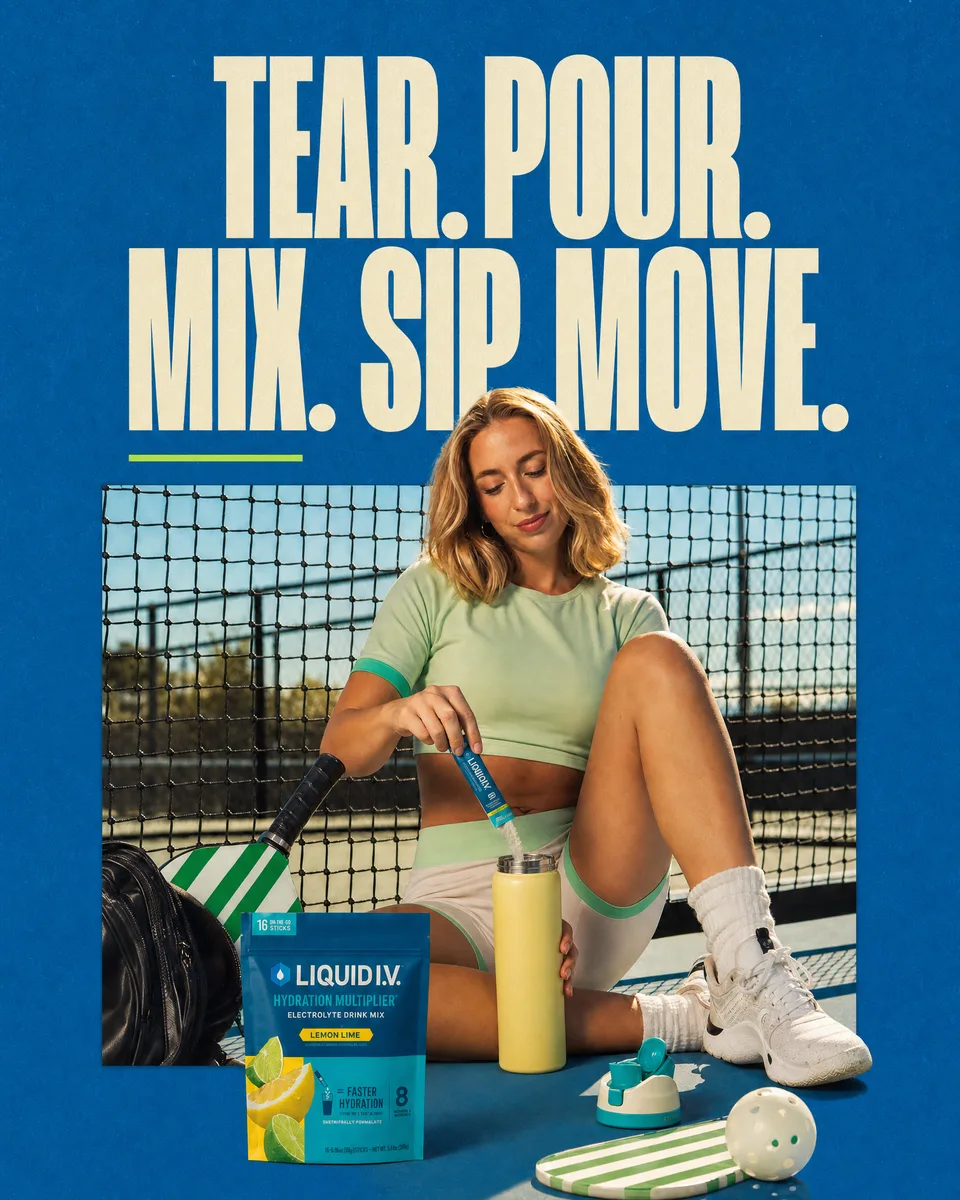
3. See one ad become two landing page directions
Begin with the source ad, then decide which post-click story you want to test. The campaign promise, product, audience, and offer should remain recognizable on both pages.
These complete pages use the same campaign ingredients but organize them around different shopper questions.
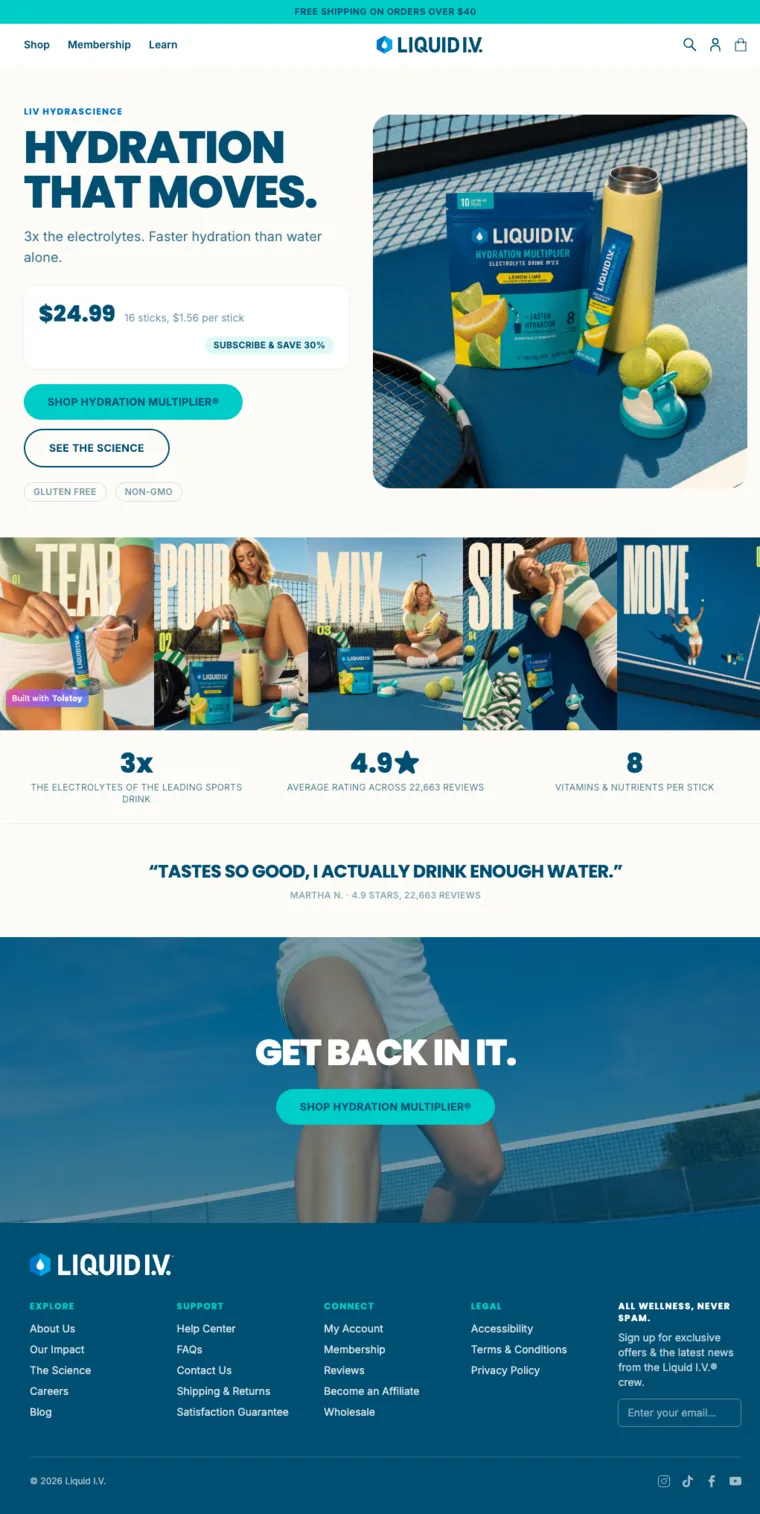
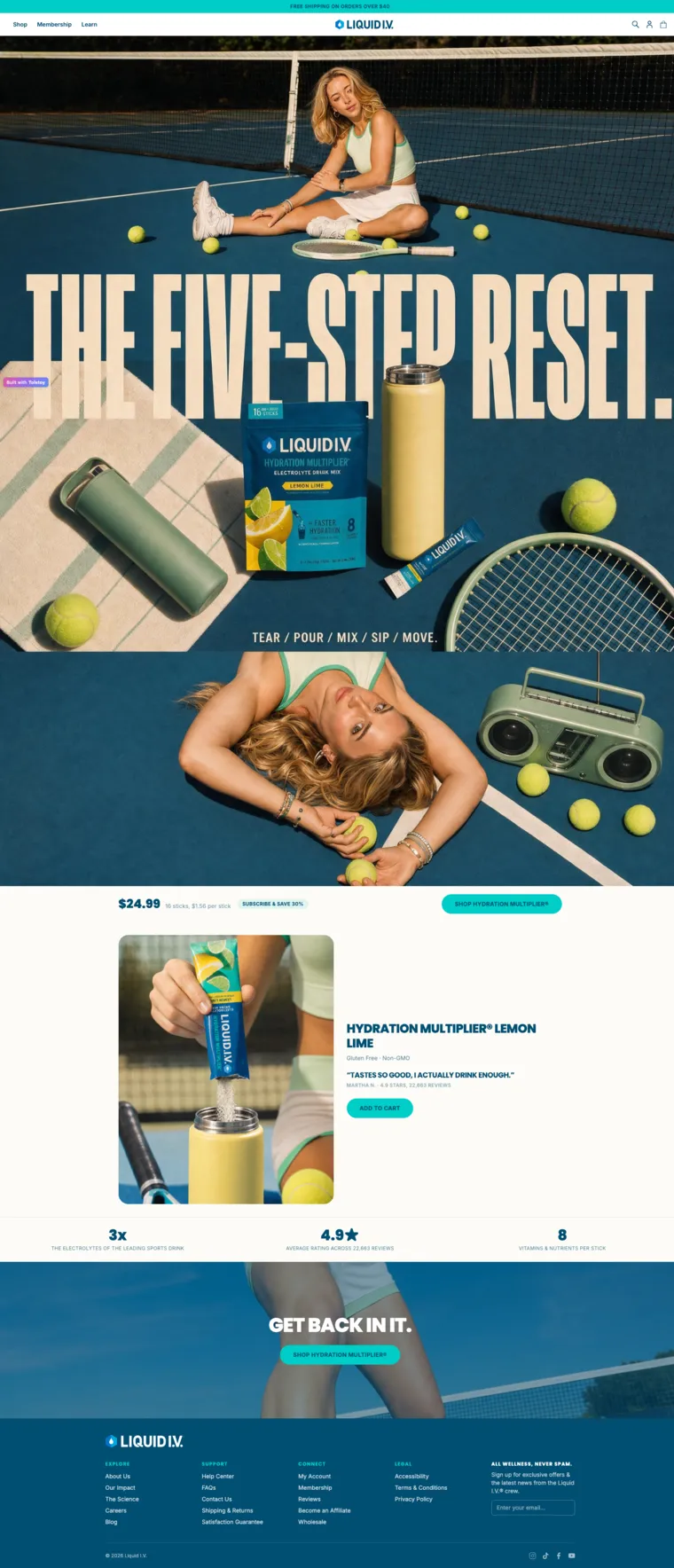
| Test element | Variant A | Variant B |
|---|---|---|
| Opening hierarchy | Product, price, benefits, proof, and CTA | Campaign story, use sequence, then product and CTA |
| Question being tested | Does faster access to the offer make the next step clearer? | Does a stronger continuation of the ad make the next step clearer? |
| Keep fixed | Source ad, audience, product, approved offer, primary CTA, traffic source, checkout path, and measurement plan | |
The useful output is a clear answer to one question: which page hierarchy helps the same shopper understand and act on the same campaign promise?
4. Build, publish, and measure with Tolstoy's Widget Builder
Tolstoy Website projects include landing-page templates inside the Widget Builder, part of AI Player's toolkit for building shoppable onsite experiences. The practical workflow is:
- Ask: provide the approved ad, product facts, audience, offer, proof, brand rules, and test question.
- Build: create as many page variants as the test plan needs and give each one a distinct content hierarchy.
- Preview: review the real page experience on desktop and mobile before sending traffic.
- Publish: publish the experience to a hosted Tolstoy website URL and open a specific variant through its variant URL.
- Measure: track page views and CTA activity by variant, then connect the relevant downstream commerce events.
The builder accelerates page creation. Your experiment design still controls traffic allocation, variant assignment, the primary metric, and the stopping rule. Verify those connections and the checkout handoff before launch. Shopify-theme publishing is a separate implementation path from a hosted Tolstoy landing page.
5. QA every landing page variant before sending traffic
Use the same review standard for every variant. Fast generation is useful only when product truth and measurement survive the speed.
Message match
- Can a shopper recognize the source ad in the first screen?
- Does the page preserve the approved promise, audience, and offer?
- Is the variant changing one decision path instead of changing the whole campaign?
Product and brand
- Are the SKU, variant, price, availability, ingredients, specifications, and policies accurate?
- Are UGC, reviews, and product claims real and approved for this use?
- Does the page use the brand's real voice, visual system, and prohibited-language rules?
When a challenger needs new campaign-ready images or video, AI Studio can create assets from brand and product context. Keep every output inside the same claim and product-truth review before publishing.
Experience and measurement
- Does mobile preserve the product, promise, and primary CTA?
- Do every CTA, product link, variant selector, cart action, and checkout handoff work?
- Do page-view, CTA, add-to-cart, and purchase events preserve the traffic source and assigned variant?
- Is the assignment stable so a shopper does not switch variants mid-test?
6. Turn the result into the next landing page test
A useful result explains the shopper decision, not only which URL won.
- Name the winner. Record the control, challenger, audience, offer window, and primary outcome.
- Write the learning. State which page story made the decision clearer and for whom.
- Check guardrails. Confirm that the apparent win did not create problems later in the funnel.
- Promote and repeat. Make the winner the new control and activate the next strong hypothesis.
That is where variant volume becomes valuable. The Widget Builder gives the team more ideas to test; the sequence of controlled comparisons turns those ideas into reusable evidence.
7. Close the CRO learning loop
A landing-page A/B test matters when its result changes the next decision. Tolstoy gives teams a way to run that work as one loop: bring in the approved campaign and commerce context, create and publish the variants, measure the shopper response, and turn the learning into the next challenger.
Tolstoy's current workspace integration catalog includes 41 connections across commerce, ads, analytics, content, reviews, support, and retention. That broader context includes systems such as Shopify, Meta Ads, TikTok Ads, Google Analytics, Triple Whale, Google Drive, Canva, Klaviyo, Gorgias, Yotpo, Judge.me, and Okendo. Which systems feed a specific test still depends on the workspace setup and measurement plan.
The operating principle stays simple: keep each comparison controlled, write down what changed the shopper's decision, and use that evidence to make the next page better.
Ready to build the first challenger? Open Tolstoy's Website templates with the exact ad, product facts, audience, offer, and proof your team has already approved.
Frequently asked questions
Can Tolstoy's Widget Builder create multiple landing page variants?
Yes. Teams can create as many page variants as their test plan needs within a Website project. For a readable A/B test, activate a control and one meaningful challenger at a time unless the experimentation setup and traffic can support more variants.
What is the difference between Tolstoy's Website Builder and Widget Builder?
Website is the project area for onsite experiences. The Widget Builder is the creation surface used to build those experiences, including focused landing-page variants.
What should stay the same in a landing page A/B test?
Keep the source ad, audience, product, approved offer, primary CTA, traffic source, and measurement plan consistent. Change one meaningful decision path, such as leading with product proof instead of the shopper's main objection.
How many landing page variants should an ecommerce team create?
Create as many strong hypotheses as the team needs, but do not confuse production volume with test quality. Start with a control and the strongest challenger, record the result, then test the next challenger.
How does Tolstoy publish a landing page variant?
A Website project can publish to a hosted Tolstoy website URL, and a specific page variant can be opened through its variant URL. Confirm traffic assignment, attribution, checkout handoff, and the correct Shopify implementation path before launch.
Create with Tolstoy
Put these ideas into practice
Turn your product ideas into AI images, videos, and shopping experiences.