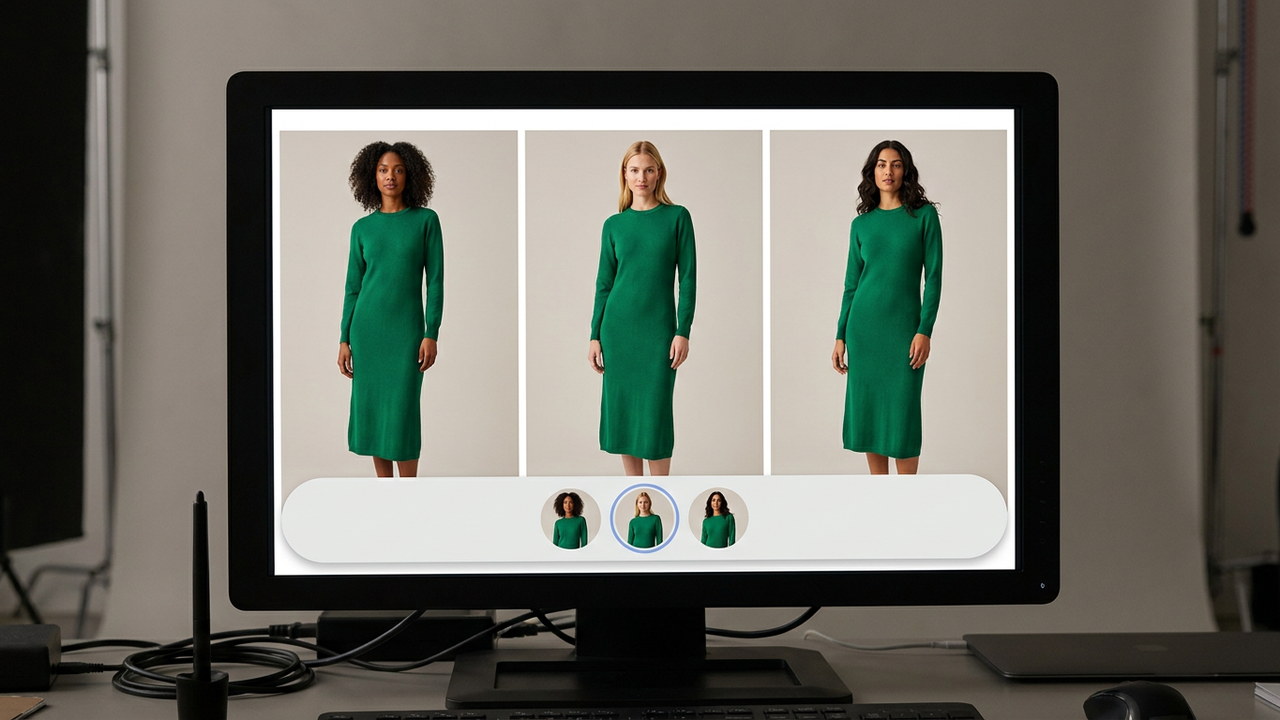
Quick answer: you already have the set, you need new casting
Swapping models on existing fashion PDP photos means taking an on-model image you have already approved and changing only the person in it — the garment, pose, lighting, camera framing, and crop carry over from the source frame — so a published set can be recast for a new market, a new demographic, or an A/B test without a reshoot and without regenerating the shot from the product photo.
The distinction that matters is where the garment comes from. In a regeneration, the garment is produced again from the product input, so every print, trim, and colorway is back in play. In a swap, the garment comes from a frame a person already signed off on, and identity is the only variable you are changing.
- The asset is not the unit of work: you recast a set — hero, full length, detail crop — not one image.
- Preserve first, change second: pose, lighting, crop, and garment are inherited; casting is the edit.
- Fidelity still needs a gate: a new body means a new drape, and drape is where garments drift.
- Swap is not the answer to everything: a new pose or setting is a new shot, not a recast.
- Where this sits: the category overview is AI fashion catalog production at scale.
Why a published on-model library goes stale
A catalog team finishes a drop, ships the PDP sets, and moves on. Then the reasons to revisit those images start arriving, and none of them are about the product.
A market launch needs casting that reads as local. A wholesale partner or marketplace wants imagery that matches their own audience. Merchandising wants to test whether a different casting converts better on the same style. A returning seasonal campaign needs the same garments on different people. In every one of these cases the garment is unchanged, the framing is fine, and the only thing wrong with the existing image is who is in it.
The two conventional answers both overshoot. A reshoot means samples, casting, a studio day, and a retouch queue for products that were photographed correctly the first time. A full regeneration from the product photo throws away the approved frame and starts over — new pose, new lighting, new crop, and a fresh fidelity review on every SKU, which is the expensive part. Both produce a set that no longer matches the one it replaced.
What the situation actually calls for is a narrower edit than either: keep the shot, change the cast.
Swap, generate, and diversity-from-zero are three different jobs
These get collapsed in tool marketing, and collapsing them is how teams end up using the wrong one. The clean way to separate them is by what the output is derived from.
- On-model generation derives from a product input — a flat lay, packshot, or supplier photo — and produces a shot that did not exist before. The model, pose, setting, and lighting are all decisions the run makes. This is how a set gets created. It is covered in building a full PDP image set from one photo.
- Diversity-from-zero is on-model generation run several times with different casting specified, producing a group of independent images. Nothing links them to each other: each output is a separate shot with its own review, and the garment is re-derived every time.
- Model swap, or recast, derives from an approved on-model frame. The source image supplies the garment, pose, lighting, and crop; the run changes identity. The output is a variant of a known-good image, which is why it can be reviewed against a single, specific reference.
The operational consequence is review volume. Generation and diversity-from-zero produce images that must each be checked against the product from scratch. A swap produces images that are checked against one approved frame, on a much shorter list of failure modes. That is the efficiency, and it disappears the moment you let a swap change more than identity.
What a swap preserves, and what it is allowed to change
Write this down before the first batch, because it is also the review checklist.
Inherited from the source frame — must not change:
- The garment. Silhouette, colorway, print scale and placement, construction, trims, hardware, and any logo or printed text.
- Pose and body position. The stance, arm and hand position, and head angle that the set was art-directed around.
- Lighting and background. Key direction, softness, shadow behavior, and the seamless or setting behind the model.
- Camera framing and crop. Focal character, subject scale in frame, and where the crop lands — a recast set has to sit next to its neighbors in a collection grid.
Changed deliberately:
- Identity and casting. Face, skin tone, hair, and the apparent age or demographic the set is being recast for.
- Body proportion, within reason. Casting a different figure is often the point. It is also the change that puts the most pressure on garment fidelity, because the garment must be re-draped rather than re-pasted.
That last point is the one teams underestimate. A swap sounds like a head replacement; on a real body it is not. Sleeve break, hem length relative to the leg, waist placement, and how a print stretches across the chest all shift when the figure underneath changes. The garment is still the garment, but it is being re-rendered onto a new form, which is exactly why the review gate below is not optional.
The recast workflow, set by set
Step 1: select an approved set, not an image
Start from a set that has already passed review and published — that approval is the whole reason a swap is cheaper than a regeneration. Pull every frame in it: hero, full length or back view, detail crop, in-context frame. If your detail crops do not show a face, note which frames are actually in scope; a sleeve macro usually does not need recasting and reusing the original keeps the set consistent for free.
Also decide the scope of the run up front. Recasting one style teaches you very little. Recasting a category, or one drop, tells you what your failure rate is and which garment types cause it.
Step 2: define the target casting once
The target casting is a reusable decision, not a per-image prompt. Describe the market or demographic you are recasting for, and save it the same way you saved the original creative direction, so the second market and the next drop run against the same definition instead of being re-described by whoever runs the batch.
In Tolstoy's AI Studio, that saved context is Brand DNA — brand, audience, models, styling, and creative direction held in one place and applied across runs. Run the recast with the approved frame as the reference and the saved direction attached, overriding only the casting, so a localized set stays recognizably the same brand.
Step 3: run the swap across the set
Run every in-scope frame of the set through the same casting in one batch, rather than image by image. A set recast frame-by-frame drifts: the hero and the back view end up with two people who are almost, but not quite, the same person, and nothing downstream catches that because each image passes on its own.
Keep the derivative linked to the source SKU and the source frame. You will need that link at review time, and again later when the original is updated or retired and its derivatives have to follow.
Step 4: review each swap against the frame it came from
A swap gets a narrower review than a fresh generation, but it gets a stricter comparison: put the output next to its source frame, not next to the other outputs, and check in order.
- Garment identity. Same colorway, same print, same trims and hardware, same construction as the source frame.
- Print scale and placement after re-drape. The most common failure, because the print is now stretching across a different body.
- Silhouette and length. Hem, sleeve break, and waist placement relative to the new figure — plausible for the garment, not just plausible for the person.
- Logos and text. The least reliable element in any generated image, and no more reliable in an edit.
- Pose, lighting, and crop drift. Anything that was supposed to be inherited and quietly was not.
- Set coherence. Does the same person appear in every frame, and does the recast set sit next to the original in a grid without looking like a different shoot?
Each frame ends with a decision: approve, re-run with a specific correction, or drop back to a full regeneration or a shoot. If you already run a fidelity gate on generated images, a swap belongs in it with its reference switched from the product photo to the source frame — the routing logic is the same, and it is described in garment-fidelity QA before the PDP.
Step 5: publish derivatives without losing the original
A recast set is usually an additional set, not a replacement: the original stays live for its market while the derivative serves another storefront, locale, partner feed, or test cell. Decide where each variant is allowed to appear before you publish, and keep the original as the canonical reference for the next recast, so later swaps derive from the approved source rather than from a copy of a copy.
Where recasting earns its place
- Market localization. One catalog, several storefronts, casting that reads as local on each — without shooting the same garments several times.
- A/B casting tests. The cleanest possible test, because the garment, pose, lighting, and crop are identical between cells and casting is the only variable. Run it on a category with enough traffic to settle, and keep the losing set — it is your control for the next test.
- Seasonal and campaign reuse. Carryover styles that return each season can be recast to match the current campaign's casting instead of being re-shot or left looking like last year.
- Partner and marketplace feeds. Wholesale partners and marketplaces often have their own imagery expectations; a recast derivative meets them without forking your production process.
- Filling a set the original shoot did not cover. Where a drop was shot on one model and the assortment needs range, recasting an approved set is faster than commissioning the gap.
When to regenerate or shoot instead
A swap is the wrong tool more often than vendor demos suggest. Reach for something else when:
- The source pose or framing is the problem. A swap inherits the shot's flaws. If the pose hides the product, the crop is wrong, or the lighting was never right, regenerate the shot instead of recasting a bad one.
- The garment's construction is the selling point. Heavily structured tailoring, sheer or reflective fabric, and intricate embellishment re-drape badly onto a new figure. These are the styles where a swap quietly changes the product.
- The change is more than casting. New setting, new styling, new crop, new season's mood — that is a new shot. Start from the product and generate it properly, as in producing on-model catalog photos at high-SKU scale.
- A fit or body claim is attached to the image. A recast image is a visualization, not evidence of how a garment fits a specific body, and it should never be presented as one.
- Marketplace, channel, or contractual rules limit it. Some channels restrict synthetic or altered imagery, and talent agreements can restrict deriving new work from a shot. Check before a derivative reaches a feed, not after.
How recasting fits the rest of catalog production
Model swap is one stage of a longer pipeline, and it is the stage that only exists because the earlier ones did their job. Generation creates the set from a product input. A fidelity gate decides what publishes. Recasting takes what published and extends its reach — more markets, more tests, more channels — off assets you have already paid the review cost on once.
Tools in this category sit at different points in that pipeline, which usually decides fit more than any single output comparison. Some tools are built around the swap itself, as a fast edit on an image you bring, and leave the surrounding catalog, review, and publishing steps to your own tools. Others offer product-to-model generation as a component you build a workflow around. General product-image editors treat model work as one capability among many. Tolstoy covers the commerce workflow: catalog context and saved brand direction in, on-model images plus product video and ad creative out, human review against the source, then publishing to the storefront.
Use the criteria in the FAQ below against a real batch from your own catalog, on your hardest category rather than your easiest, before committing to any of them.
Start with one set
Pick one published set in a category where casting genuinely matters, and run the whole loop once: select the frames, save the target casting, swap the set in one batch, review each frame against its source, and publish the derivative alongside the original. Note which garment types failed re-drape and how often, because that failure rate — on your catalog, not a demo's — is what tells you whether to recast a market or shoot it.
See how the full pipeline works on AI fashion catalog production at scale, or talk to our team about recasting a set from your catalog.
Frequently asked questions
How do I swap the model on existing fashion PDP photos without regenerating the garment?
Start from the approved image rather than from the product photo, and constrain the edit to identity. The garment pixels, pose, camera framing, crop, and lighting come from the source frame; only the person changes. That is the difference between a swap and a regeneration — a regeneration re-decides the garment every time, so every colorway, print, and trim has to be re-checked from scratch.
Does an AI model swap keep pose, lighting, and garment fidelity?
It should keep pose, lighting, and framing by construction, because those are inherited from the source frame instead of being described in a prompt. Garment fidelity is the part that still needs proving. Body shape changes between castings, so the garment has to be re-draped over a new figure, and that is where print scale, hem length, and trim placement drift. Review every swapped frame against the same source you swapped from.
How do I recast an on-model PDP set for a new market or demographic?
Treat the set, not the image, as the unit of work. Pick the published set you want to localize, define the target casting once as saved direction, run every frame in that set through the same swap, and review the set as a group so the hero, back view, and detail crops still read as one shoot. Recasting images one at a time is how a localized PDP ends up with three different people wearing the same dress.
When should we regenerate instead of swapping models on an existing set?
Regenerate when the thing you want to change is not the person. A new pose, a new setting, a different crop, or a seasonal styling change is a new shot, and forcing it out of a swap produces a worse image than starting from the product. Swap when the set is right and only the casting is wrong.
Is a model swap the same as generating diverse models from scratch?
No, and the distinction matters operationally. Diversity-from-scratch builds a new shot from a product photo, so each output is an independent image with its own review burden. A swap derives from an already-approved frame, so the comparison is one-to-one and the review is narrower. Most catalogs need both: generation to create the set, swap to recast it afterward.
How do you compare AI model-swap tools for a fashion catalog?
Score the workflow around the edit, not the single output. Ask whether it can operate on a whole published set rather than one image, whether the target casting can be saved once and reused across drops, whether the garment is carried from the source frame rather than re-described, whether there is a review step that puts the swap next to its source, whether swapped derivatives stay linked to the original SKU, and whether approved assets can reach the storefront. A tool that produces one convincing image and no set-level workflow moves the bottleneck rather than removing it.
Create with Tolstoy
Put these ideas into practice
Turn your product ideas into AI images, videos, and shopping experiences.