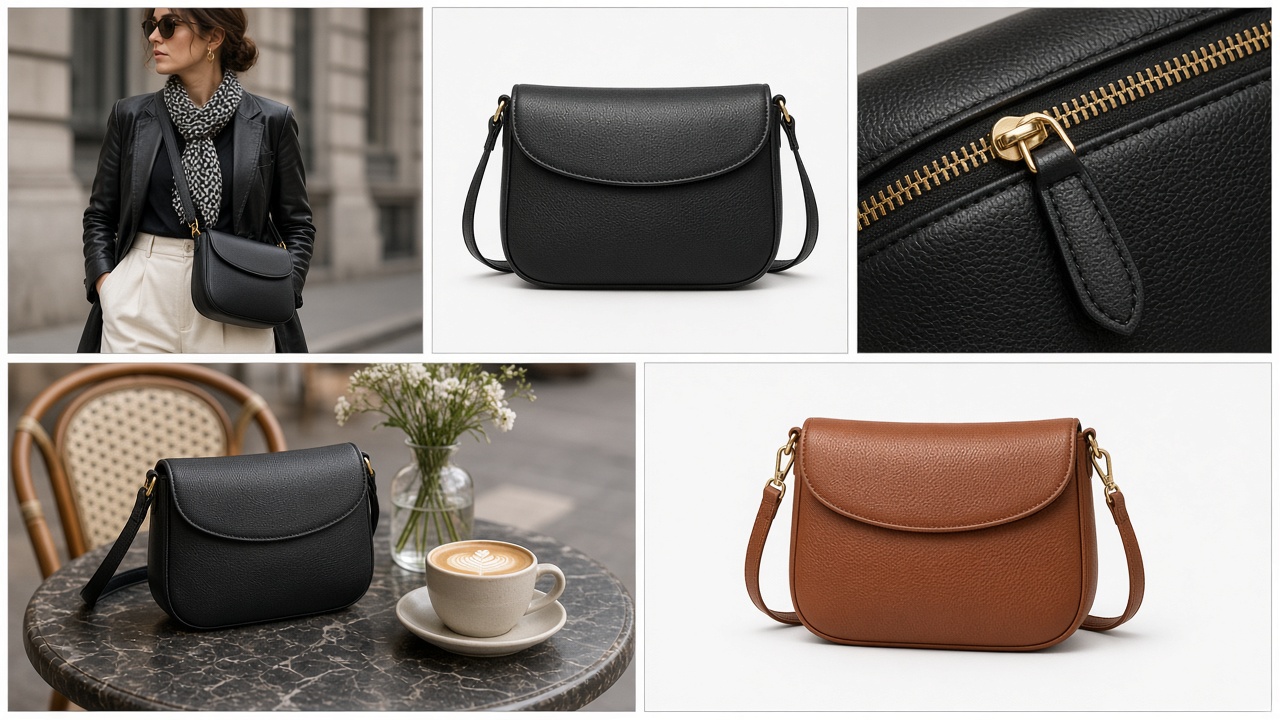
Quick answer: one clean photo in, a reviewed PDP set out
Building a full fashion PDP image set from one garment photo means taking a single flat lay or packshot and producing every view a product page needs — on-model, ghost or flat, detail crops, lifestyle, and colorways — against a saved brand direction, with a person approving each image against the source before it publishes.
It is the per-SKU unit of AI fashion catalog production at scale: get one style right from one input, then repeat the same template across the catalog.
- The problem: most long-tail styles launch with one or two supplier images instead of a full set.
- The input: one clean, full-garment photo — plus a second only when the back or an interior detail sells the product.
- The output: a fixed set of views per style, defined once as a template.
- The control: saved brand direction for consistency, human review for accuracy.
Why most SKUs launch with one or two images
Walk through almost any fashion catalog outside the hero styles and the pattern is the same: a supplier flat lay, maybe a second angle, and nothing else. No on-model view, no detail crop, no sense of how the piece is worn.
That is not a lack of intent. A full shot list needs the sample in hand, a model booked, a studio day, and retouching — and those steps are scheduled around the styles expected to sell best. Everything else waits for a shoot that never comes, and launches with whatever arrived from the supplier.
The gap sits on exactly the pages that have the least else going for them. The product exists, the photo exists, but the rest of the set does not.
What a complete fashion PDP image set includes
Before choosing any tool, fix the template. A complete set for a typical apparel style covers:
- On-model hero. The primary image in collection grids and at the top of the PDP — the garment worn, framed to the brand's standard crop.
- Back or full-length on-model view. Shows length, fit intent, and the back of the garment where it matters.
- Ghost-mannequin or flat presentation. A clean, model-free view of shape and construction for shoppers who want to see the garment itself.
- Detail crops. Fabric texture, print, stitching, closures, and hardware at a scale a thumbnail cannot show.
- Lifestyle or in-context frame. The piece styled in a setting that matches the brand, useful on the PDP and reusable in email and ads.
- Colorway views. A matching hero for each colorway that reads differently on a model, so variant switching shows the right product.
Not every category needs every view — basics may skip lifestyle, accessories may skip on-model — but the decision should be made per category, once, not per style.
The one-input workflow
With the template fixed, each style follows the same path:
- Check the input. Full garment in frame, sharp, evenly lit, clean background, pressed, no watermarks or marketplace screenshots. A bad source becomes a bad set, multiplied by every view.
- Attach the product context. Title, category, variants, and material from the catalog, so the output is tied to the real SKU rather than a loose image.
- Apply the saved direction. The same models, setting, lighting, framing, and styling rules used for the rest of the catalog.
- Generate the template views. On-model hero, a back or full-length view where the input shows it, ghost or flat, detail crops, lifestyle, then colorway variants from the approved hero.
- Review against the source. Every image, side by side with the original garment photo.
- Publish the approved set. Regenerations and manual finishes go back into the queue without blocking the images that passed.
One photo is enough for what the photo shows. If the back of a jacket has a print, or a lining is part of the pitch, add that photo at intake. Asking a system to invent unseen construction is how inaccurate product pages get made.
What the reviewer checks
Review against the source photo, not against the other generated images. Outputs that match each other can still all be wrong about the garment.
- Silhouette and proportion: length, volume, and shape match the real piece.
- Color and colorway: verified against the product, especially for generated variants.
- Print scale and placement: repeat size, direction, and where motifs land.
- Logos, labels, and text: small type is the least reliable element in any generated image.
- Construction: seams, panels, closures, and hardware.
- Brand fit: styling, pose, and setting follow the saved direction.
Each image gets one of three outcomes: approve, regenerate with a specific correction, or send to manual finishing.
Keep the brand direction light but saved
A PDP set only looks like the rest of the store if the same decisions apply to every style. In Tolstoy that lives in Brand DNA and a saved creative direction: the model roster, setting and lighting, framing and crop per view, styling rules, and brand assets such as logos, colors, and reference files.
It does not need to be exhaustive on day one. A short, specific direction — who wears the product, where, in what light, cropped how — is enough to stop drift. Refine it when review keeps flagging the same issue, not before. For describing the garment itself, our guide to prompting for apparel brands covers the fabric and construction vocabulary that matters.
When to still shoot
A one-photo workflow is for catalog breadth. Keep the camera for:
- Campaign and hero imagery that carries the season's brand story.
- Material-led products — sheer, reflective, heavily structured, or intricately embellished — where the fabric's behavior is the selling point.
- Fit and drape claims. Generated on-model images are creative visualizations, not evidence of how a garment fits a real body, and should never be presented as such.
- Categories where the image carries a compliance or claims burden.
Everything between shoots — long-tail styles, new colorways, restocks, and refreshes — is where one input and a fixed template pay off.
How to compare tools for this job
Judge the workflow against your own hardest category, not a vendor's sample gallery. The criteria that decide whether one photo reliably becomes a full set:
- Template coverage: can it produce every view in your set — on-model, ghost or flat, detail, lifestyle, colorways — or only some?
- Catalog context: does it read products and variants from your store, or does every image start as a manual upload?
- Saved direction: can the look be defined once and reused across styles and seasons?
- Review step: is there a side-by-side check against the source, with approve and regenerate actions?
- Formats beyond stills: can the same approved set feed product video and ad creative?
- Route to the storefront: does approved work reach the PDP, or end in a download folder?
- Stated limits: does the vendor say plainly where the output falls short?
Teams evaluating this category commonly shortlist The New Black, Photoroom, Graswald, Uwear, and FASHN alongside Tolstoy. They start from different points in the workflow, so run the same criteria and the same batch through each rather than comparing hand-picked samples.
Go deeper
This post covers one style from one photo. For the full category — definition, end-to-end workflow, and how it compares to traditional shoots — see AI fashion catalog production at scale. For running the same process across hundreds of styles a week, read how to produce on-model catalog photos at high-SKU scale.
Start with one style
Pick a single long-tail style that launched with only a supplier photo. Fix the template, check the input, save a short brand direction, generate the set, and review every image against the source. That one run shows what your inputs are really like and where review time goes — before you commit a whole drop.
Ready to try it on your catalog? See the workflow on AI fashion catalog production at scale, or talk to our team.
Frequently asked questions
Can you really build a full PDP image set from one garment photo?
For most catalog styles, yes — provided the one photo is a clean, sharp, full-garment flat lay or packshot. From that source, AI production can derive on-model views, a ghost or flat presentation, detail crops, lifestyle frames, and colorway variants. What it cannot do is recover information the photo does not contain, such as the back of a garment that was only shot from the front, so the input standard matters more than the tool.
What images belong in a complete fashion PDP set?
A common set is an on-model hero, a back or full-length view, a ghost-mannequin or flat presentation, one or two detail crops of fabric, print, or hardware, a lifestyle or in-context frame, and a matching view for each colorway that looks meaningfully different. Decide the set once as a template so every style ships with the same views.
What should the single input photo look like?
The whole garment in frame, sharp at full resolution, evenly lit on a clean background, pressed and correctly presented, with prints, seams, labels, and hardware legible. Avoid cropped hems, hard shadows, watermarks, and screenshots of marketplace listings. If the back or an interior detail is a selling point, add a second photo of it rather than asking the system to invent it.
How do you keep a PDP set consistent with the rest of the catalog?
Store the look outside the prompt. Models, setting, lighting, framing, crop, and styling rules belong in saved brand direction — Brand DNA in Tolstoy — so every style runs against the same decisions. Per-prompt generation drifts because each prompt re-decides what the catalog should already have settled.
Does every generated image still need human review?
Yes. Each image should be checked side by side against the source garment photo for silhouette, color, print scale and placement, logos and text, and construction details before it publishes. A reviewer approves, requests a specific regeneration, or sends it to manual finishing.
When should a brand still book a photo shoot instead?
For campaign and hero imagery, launches that carry the season's story, and products whose material behavior is the reason to buy — sheer, reflective, heavily structured, or intricately embellished pieces. Generated on-model images are creative visualizations and should not be presented as evidence of how a garment fits a real body.
Create with Tolstoy
Put these ideas into practice
Turn your product ideas into AI images, videos, and shopping experiences.