Quick answer
A support chatbot is built to resolve customer-service work. An AI sales assistant is built to help a shopper make a buying decision. For a Shopify store, the cleanest setup often uses both: the sales assistant handles product discovery, recommendations, fit, and cart building; the support system handles order status, returns, account changes, and human escalation.
- Start with support if repetitive post-purchase questions are filling the queue.
- Start with a sales assistant if shoppers need help choosing between products, sizes, shades, routines, or outfits.
- Do not choose by product label alone. Gorgias, Intercom, Tidio, Rep, and other vendors now cover parts of both jobs.
- Test the action after the answer: recommend a product, update a cart, look up an order, process a return, or hand off to a person.
The chat window is not the strategy
A shopper can ask, "Which moisturizer works for oily skin?" and follow it five minutes later with, "Where is my last order?" Those questions look similar in a chat transcript. They require different data, different permissions, and different measures of success.
The useful way to compare an AI sales assistant with a support chatbot is to ask what the system must do after it understands the question. That exposes the difference between a polished answer and a working ecommerce workflow.
The difference is the job after the answer
A support chatbot is optimized for resolution. It needs access to policies, order and account context, ticket history, and a dependable path to a human. An AI sales assistant is optimized for decision support. It needs trustworthy catalog data, merchandising logic, inventory awareness, product media, and shopping actions.
| What to compare | Support chatbot | AI sales assistant |
|---|---|---|
| Primary job | Resolve a service issue | Help a shopper decide what to buy |
| Typical questions | Order status, shipping, returns, cancellations, subscriptions | Product fit, comparisons, routines, sizing, shades, bundles, styling |
| Critical data | Customer identity, orders, policies, tickets, account history | Catalog, variants, inventory, product attributes, brand and merchandising rules |
| Useful actions | Track or modify an order, start a return, create a ticket, escalate | Recommend, compare, try on, build a look, add products to cart |
| Failure to avoid | Exposing account data or blocking access to a human | Recommending the wrong product, size, shade, price, or availability |
| Core success measure | Correct resolution with an acceptable customer experience | More shoppers reaching a confident product or cart decision |
The categories overlap. A support platform may recommend products, and a sales agent may answer a shipping-policy question. The distinction still matters because the risky actions sit in different places. A plausible product suggestion is not the same as an authenticated order change.
Which competitors span support and shopping?
The market no longer splits neatly into "support bot" and "sales bot." Use the map below as a starting point, then verify the current feature, integration, and pricing details with each vendor.
| Platform | Where it is strongest | What a Shopify team should test |
|---|---|---|
| Gorgias AI Agent | Ecommerce support operations, Shopify-aware service actions, and a growing pre-purchase shopping assistant | Order tracking, returns, edits, human handoff, product discovery, and whether one agent can cover both roles cleanly |
| Intercom Fin | Customer service with configurable service, sales, and ecommerce roles across a broader helpdesk stack | Escalation rules, channel coverage, knowledge quality, Shopify integration, and how roles switch during one conversation |
| Tidio Lyro | Support automation and human handoff, with shopping recommendations and Shopify cart actions | Order-status workflows, ticket creation, product-feed accuracy, out-of-stock handling, and add-to-cart behavior |
| Rep AI | Proactive ecommerce conversations that combine sales and support | Trigger logic, product recommendations, brand control, shopper context, and support escalation |
| Manifest AI | Shopify shopping assistance, quizzes, buyer-objection handling, and product recommendations | Catalog setup, recommendation quality, multilingual answers, inbox workflow, and handoff to a person |
This is not a ranking. It is a buying shortcut. If authenticated order work is the urgent problem, start the evaluation with the support workflow. If product choice is the urgent problem, start with the shopping experience and make support handoff a requirement.
Choose a support chatbot first when service work is the bottleneck
A support-first rollout makes sense when the team is buried in repeat questions, customers wait too long for basic answers, or agents spend their day moving between Shopify and the helpdesk.
Give the support system the work that depends on customer identity or operational authority:
- "Where is order #1842?"
- "Can I change the shipping address?"
- "Start a return for the second item."
- "Why was my subscription renewed?"
- "I need an exception to the return policy."
Judge the pilot on correctness, containment, escalation quality, and the time it saves the support team. A high automated-response count is weak evidence if customers still repeat themselves when a person takes over.
Choose a sales assistant first when product choice is the bottleneck
A sales-first rollout makes sense when shoppers reach a product page but still need the kind of help they would get from a strong store associate.
The best starting questions are specific to the catalog:
- "Which serum should I use with retinol if my skin is sensitive?"
- "Will this top work for a business dinner?"
- "What size should I choose with these measurements?"
- "Show me a jacket and shoes that work with this dress."
- "Compare these two products and add the better option to my cart."
These are merchandising questions. The agent has to understand the shopper's constraint, retrieve eligible products, explain the choice, and make the next shopping action easy. Generic FAQ answers will not carry the experience.
What Tolstoy AI Sales Agent actually does
Tolstoy AI Sales Agent is the pre-purchase layer in this stack. It combines product Q&A with visual shopping tools and commerce actions. The point is to help the shopper move from "I am not sure" to a product, look, or cart they understand.
Product questions and recommendations
AI Sales Agent can use catalog and brand context to answer product questions, suggest products, and show common questions directly on a product detail page. Teams can add instructions and knowledge sources, shape the communication style, and review where answers need more context.
That last step matters. In one recent customer call, a beauty brand found that a recommendation for oily, acne-prone skin did not match the team's product expertise. The fix was not more confident copy. The team needed better product guidance in the knowledge base and a clean way to test the answer again. Recommendation quality should be part of launch QA, not a post-launch surprise.
Virtual try-on turns a product question into a visual decision
For supported categories, virtual try-on lets a shopper upload a photo or use an approved model to see a product in context. Fashion shoppers can visualize apparel and accessories. Beauty shoppers can test relevant try-on experiences. Size guidance can sit beside the visual flow when the brand has the right product and measurement data.
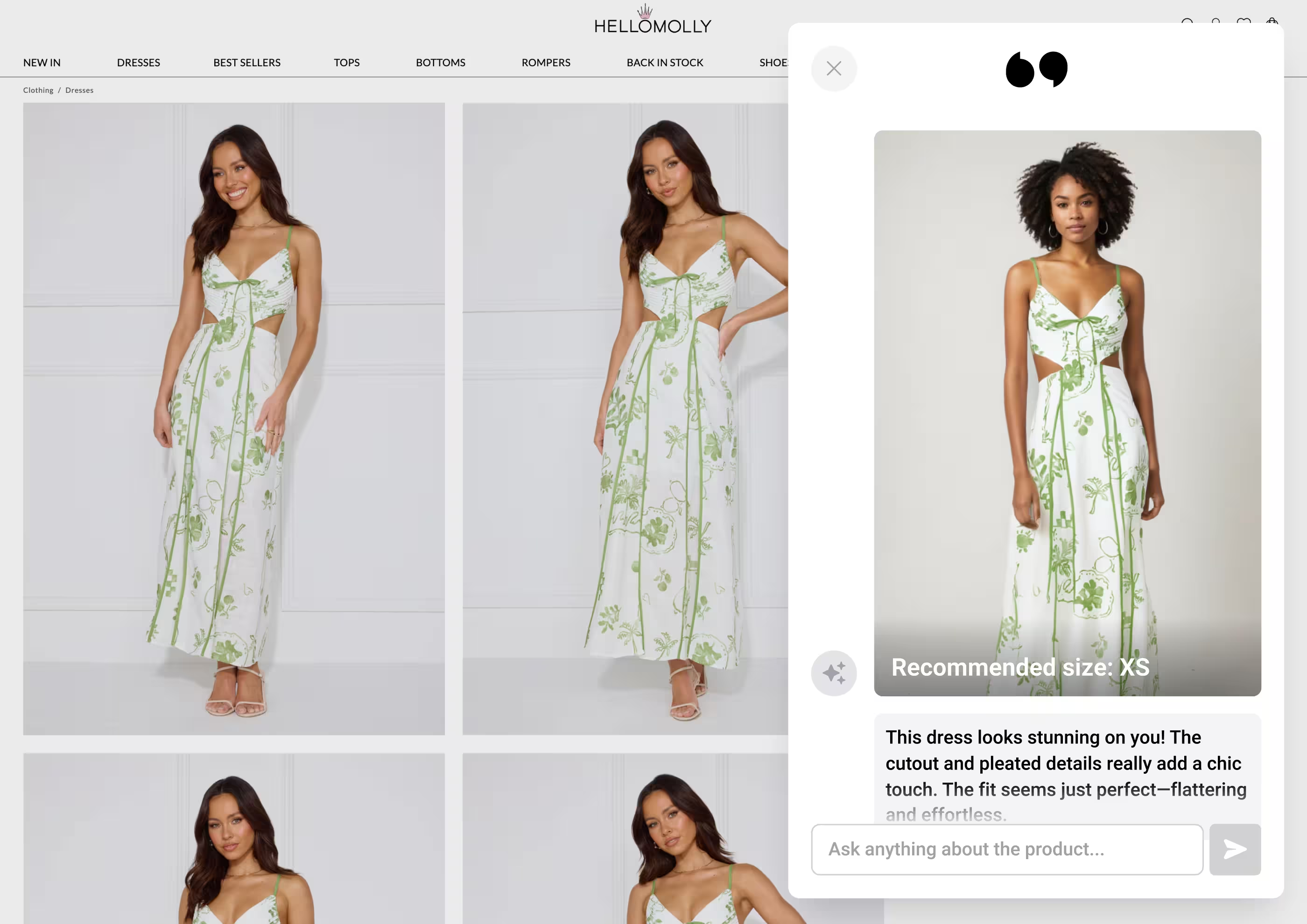
The useful standard is product fidelity, not novelty. Test shape, color, pattern, crop, available sizes, mobile layout, and the quality of ordinary phone photos. Keep the experience in a preview theme until the brand is comfortable with the output.
Complete the Look makes cross-selling visual
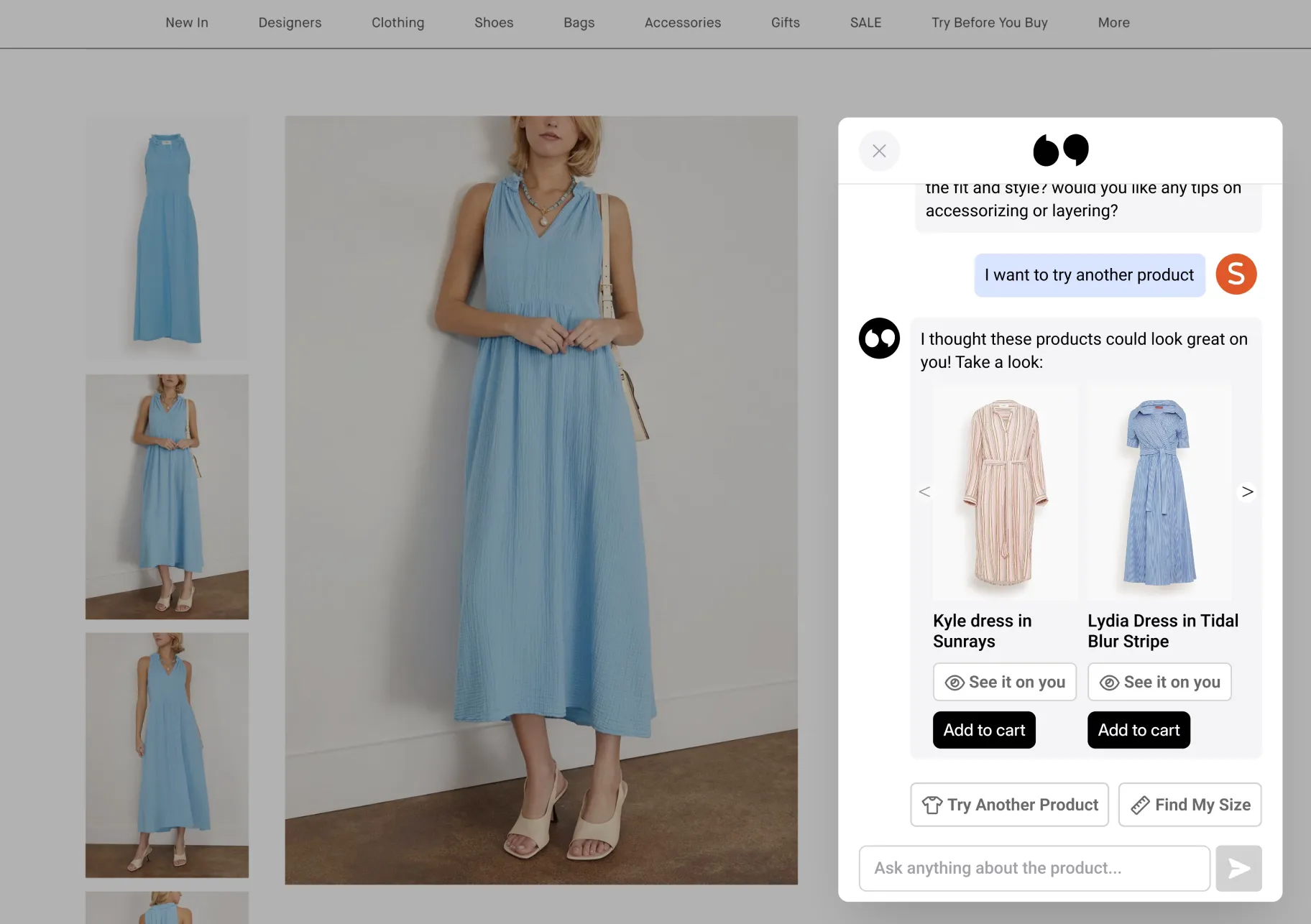
Complete the Look starts with an item the shopper already likes. AI Sales Agent can then build around it:
- Use the selected product as the anchor item.
- Recommend complementary categories from the live catalog, such as pants, a jacket, shoes, or accessories.
- Apply brand rules to the pairing logic. A merchandiser might specify which shoes work with a long dress or which products should never appear together.
- Generate the updated outfit so the shopper can see the combination.
- Let the shopper swap pieces, update the look, and add the selected items to cart.
This is the part ecommerce teams tend to react to. In recent customer demos, the conversation quickly moved from "that is cool" to the useful questions: How does the pairing logic work? Can our merchandisers control it? Can we test it in a preview theme? Can the shopper add the whole set to cart?
Those questions explain the appeal better than a feature list. The experience turns cross-selling from a row of "you may also like" cards into a look the shopper can evaluate. Availability and setup can vary by catalog and storefront, so brands should confirm the exact workflow in a scoped pilot.
Try-on context can make Klaviyo follow-up more relevant
When a shopper has consented to marketing, try-on activity can also inform a Klaviyo flow. Instead of sending the same browse or cart reminder to everyone, the brand can use the product or outfit the shopper viewed as part of the follow-up.
Keep the lifecycle rules in Klaviyo, respect consent, and avoid overlapping abandonment messages. AI Sales Agent provides useful shopping context; it should not silently rewrite the brand's contact policy.
Route sales and support together
A shopper should not have to understand your org chart. Give the experience one visible entry point if that suits the storefront, but define ownership behind it.
| Shopper asks | Best owner | Expected next action |
|---|---|---|
| "Which shade works with my undertone?" | Sales assistant | Ask a clarifying question and recommend eligible products |
| "Build an outfit around this top." | Sales assistant | Complete the look and add selected items to cart |
| "Has my order shipped?" | Support chatbot | Authenticate, retrieve order status, and explain the next step |
| "Make an exception to the return policy." | Human support | Hand over with the conversation and account context intact |
| "Recommend a dress, and cancel my old order." | Split workflow | Handle discovery in sales, then route the authenticated order action to support |
Recent sales conversations around AI Sales Agent have reinforced this boundary directly: it is a sales agent, not a substitute for a full customer-service operation. It can work beside an existing support stack, but the exact integration, handoff, and account actions should be proven with the tools and permissions your store already uses.
A practical pilot checklist
- Choose one sales job and one support job. For example, product recommendation and order status.
- Write the routing rule. Decide when the shopping assistant answers, when support takes over, and when a human is required.
- Clean the source data. Check product attributes, variants, inventory, pricing, policies, help content, and merchandising rules.
- Test hard questions. Include ambiguous needs, unavailable products, policy exceptions, incorrect assumptions, and requests that cross the sales-support boundary.
- Run the storefront experience in preview. Check mobile layout, accessibility, page speed, product fidelity, cart contents, and escalation behavior.
- Measure each job separately. Support needs resolution and handoff metrics. Sales needs product-engagement and cart-progression evidence. Do not combine them into one vague "chatbot performance" number.
See AI Sales Agent in your store
Bring one high-traffic PDP and the support platform you already use. Tolstoy can map the sales questions, support handoff, virtual try-on, and Complete the Look flow in a scoped storefront walkthrough.
The right stack is the one that can complete the work safely. For many Shopify brands, that means a support system for service operations and a dedicated shopping layer for product decisions. The cleaner the boundary, the easier both systems are to test and improve.
Frequently asked questions
What is the difference between an AI sales assistant and a support chatbot for Shopify?
An AI sales assistant helps shoppers choose, compare, and buy products. A support chatbot resolves service issues such as order status, shipping, returns, account questions, and escalation to a human.
Which AI support chatbot competitors should Shopify brands consider?
Gorgias AI Agent, Intercom Fin, and Tidio Lyro are common options to evaluate. Their capabilities increasingly overlap with shopping assistance, so compare the exact support actions, handoff rules, channels, and Shopify data each setup can use.
Which AI sales assistant competitors should Shopify brands consider?
Rep AI and Manifest AI are ecommerce-focused shopping assistants worth comparing. Gorgias, Intercom Fin, and Tidio also offer pre-purchase features, while Tolstoy differentiates with visual shopping workflows such as virtual try-on and Complete the Look.
Do Shopify brands need both a sales assistant and a support chatbot?
Many stores do. A sales assistant can own product discovery and buying questions while the support system owns authenticated order actions, policy exceptions, and human escalation. The two experiences should have a clear routing rule.
What does Complete the Look do in Tolstoy AI Sales Agent?
Complete the Look can pair a selected item with complementary products from the catalog, apply brand merchandising rules, show the outfit through virtual try-on, let the shopper update the look, and add the selected items to cart.
Create with Tolstoy
Put these ideas into practice
Turn your product ideas into AI images, videos, and shopping experiences.