Add shoppable video to your homepage
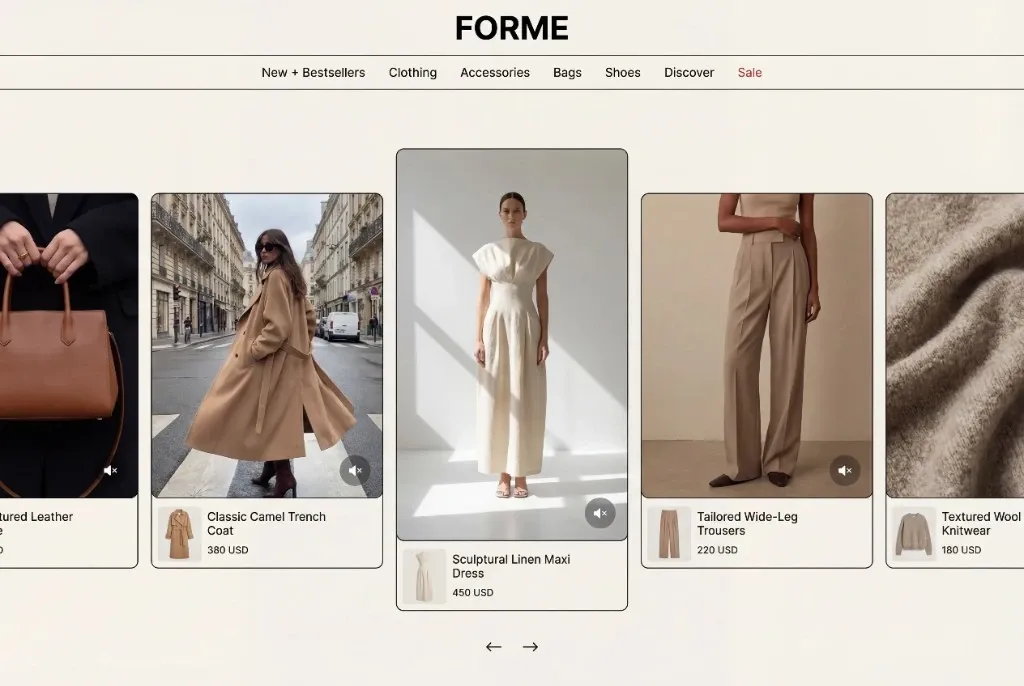
Tolstoy builds a homepage video spotlight or carousel from your own videos and connects each video to the product it shows, so shoppers can buy from the first page.
What you need
- Videos in your Tolstoy library, uploaded or imported from social
- A connected Shopify store, so each video can link to a real product
- The videos you want first, and any to leave out (optional)
What you get
- An unpublished homepage video widget built from your own videos
- The product connections you accepted, and a list of videos with no clear product match
- After you publish: the embed code and widget analytics for views, video plays and product clicks
How it runs
Tolstoy runs this playbook in 4 steps.
-
Pick the layout
The agent builds a Homepage Spotlight with one large center card and smaller side cards, or a Carousel row of 9:16 cards if you ask for one.
-
Choose the videos
The agent picks current, playable videos with no duplicates or expired promotions, puts your pinned videos first and leaves out the ones you exclude.
-
Connect videos to products
The agent proposes a product only when the video shows it, saves each connection after you accept it and lists videos with no clear match.
-
Check the preview
The agent builds an unpublished draft, checks it on desktop and mobile, and changes the order, size or style when you ask in the chat.
Check the result
- Tap every card in the preview: the player opens, and each connected video shows the right product card with add to cart.
- Read the video list: no duplicates, no expired promotions, and your pinned videos come first.
- Look at the preview at mobile width: the cards fit the screen, and the first video is the one you want shoppers to see.
Know the limits
- Publishing needs your confirmation. Then you add the Tolstoy Builder block to your homepage in the Shopify theme editor and paste the embed code.
- It uses videos already in your Tolstoy library. If you have no usable videos, the agent tells you and stops.
- A video with no connected product still plays, but the player shows no product card or add to cart for it.
When to use this playbook
Use it when your homepage shows products only as still images and you already have product videos, such as creator clips, demos or imported social posts. The widget puts a short, chosen set of those videos on the page most new visitors see, with a path from each video to its product. For other ways to put video on your homepage, read how to add videos to your Shopify homepage without YouTube.
Get better results
- Make a playlist for the homepage and name it in the prompt. You then change the homepage set by editing the playlist, not the widget.
- Connect videos to products before you build, so more cards lead to add to cart.
- After launch, replace videos that get views but almost no product clicks.
The prompt
“Run this playbook” opens Tolstoy with this prompt as a draft. Pick your products, edit anything, then send it.
Build a shoppable video widget for my Shopify homepage with the Homepage Spotlight template. Use Carousel only if I ask for a simple row of videos. Choose current, playable videos from my Tolstoy library, with no duplicates and no expired promotions. If I name a playlist, use it so the widget follows my future edits. Propose a product connection only when the video shows that product, and wait for me to accept before you save it; list videos with no clear match instead of guessing. If my workspace has more than one store, ask which one. If I have no usable videos, tell me and stop. Show me the selected videos in order, then build an unpublished draft and check it on desktop and mobile. Do not publish, change other widgets or edit shared playlists without my approval. Do not invent product claims, prices or discounts.
FAQ
Should I use the spotlight or the carousel?
The spotlight puts one video in focus at a time, which suits a short, curated set. The carousel shows more videos in one row and moves to the next card about every five seconds.
Will new videos show up without editing the widget?
That depends on how the videos are chosen. A rule, such as a playlist or a Shopify tag, picks up new matching videos on its own. A fixed list of videos stays exactly as you picked it.
Can the same videos show on my product pages too?
Yes, with a PDP stories widget on your product page template. It shows each video on the page of the product it is connected to, so you connect a video once and both widgets use the connection.
Run it on your own catalog
Start free, connect your store, and Tolstoy opens this playbook for you. You review every result before anything goes live.