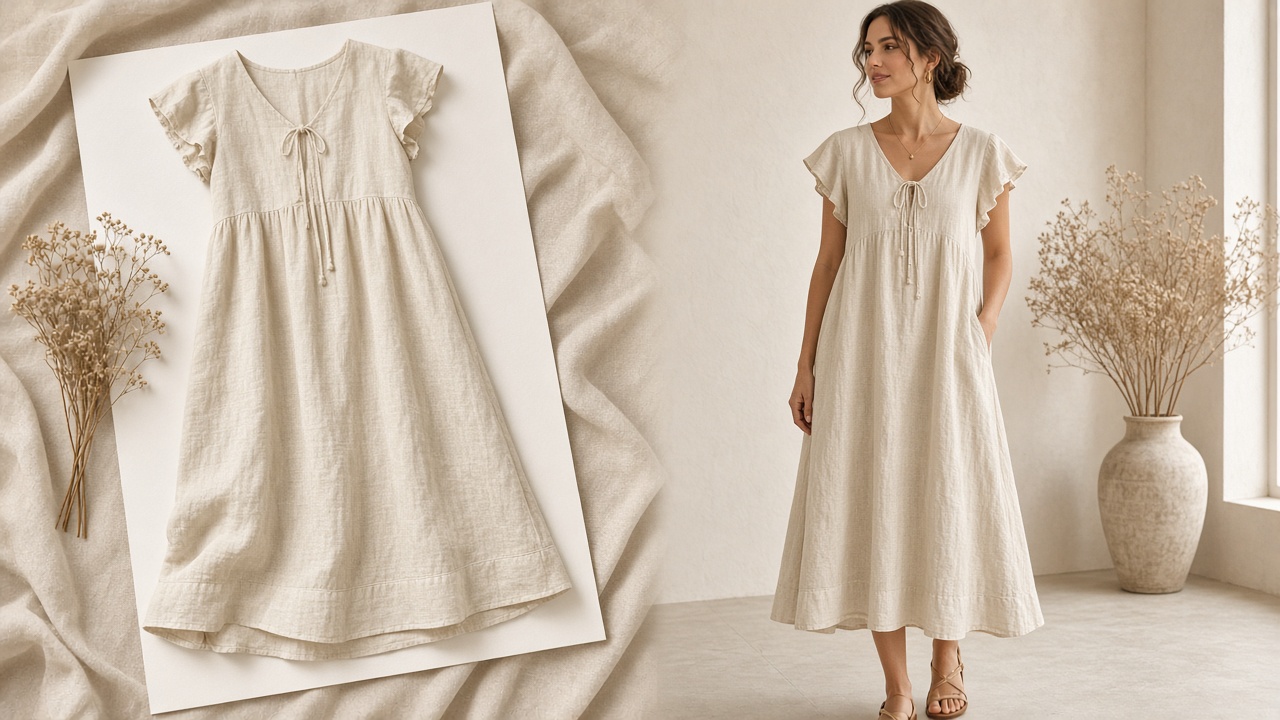
Quick answer: normalize the pack, then run every SKU against one look
Flat-lay-to-model production turns the flat lays and packshots that arrive in supplier photo packs into on-model PDP images of the same garment, applied against one saved brand direction and approved by a person against the source photo before publishing.
The hard part is not the single image. It is getting a consistent on-model PDP from supplier photos that were shot by dozens of different suppliers, in different light, on different backgrounds, with different ideas about what a complete pack means.
- The bottleneck is the pack, not the model: inconsistent supplier inputs create most of the rework downstream.
- Normalize at intake: triage every pack against one standard before anything is generated.
- Consistency is stored, not prompted: models, setting, lighting, and crop live in saved brand direction.
- Review against the source: each on-model image is checked against the supplier photo, SKU by SKU.
- Shoots still have a job: hero, campaign, and drape-driven products stay on the studio calendar.
For the category overview, see AI fashion catalog production at scale. For the weekly run-book behind it — shot-list math, batching, and throughput — see how to produce on-model catalog photos at high-SKU scale. This guide zooms in on one step: getting from the supplier's flat lay to an on-model image your catalog can use.
Why supplier photo packs are the bottleneck
Multi-brand retailers, private-label teams, and marketplace-style assortments rarely photograph every product themselves. The product arrives with a photo pack from the supplier, and that pack is what most long-tail PDPs launch with.
Anyone who has worked a catalog intake queue knows the pattern:
- Every supplier has a house style. White sweep, grey paper, wood floor, a phone photo on a bed. Put them side by side in a collection grid and the store looks like several stores.
- Packs are incomplete in different ways. One supplier sends front only, another sends a back view but no detail, a third sends only the lead colorway.
- Files do not map cleanly to SKUs. File names reference supplier style codes, not your SKU or variant, and someone has to reconcile them by hand.
- Flat lays do not sell fit or proportion. A folded or laid-out garment tells a shopper very little about how it sits on a body, which is exactly what an on-model image is for.
The traditional answer is to send samples to a studio. That works for the styles that justify a shoot day and leaves the rest of the assortment on the supplier flat lay. Generating on-model images from flat lays changes which styles can get on-model coverage at all — but only if the inputs are dealt with first.
Step 1: triage the pack before generating anything
Treat the supplier pack as raw material that has to pass inspection. A short, written triage at intake saves far more time than tuning outputs later:
- Map files to SKUs and variants. Rename or tag every file to the SKU and colorway it represents before it enters the pipeline. Unmapped files are how the wrong colorway ends up on a PDP.
- Check coverage per style. A usable set is a sharp front view per colorway that genuinely differs, a back view, and a close detail of any print, hardware, or label the buyer cares about. Flag gaps back to the supplier early.
- Check each image against the standard. Full garment in frame, even light, clean background, pressed sample, legible print and construction at full resolution, and no watermarks or marketplace screenshots.
- Sort into pass, fixable, and reject. Background cleanup and straightening are fixable. A cropped hem, a blurred print, or the wrong colorway is a reject that goes back to the supplier.
The fuller input checklist lives in the high-SKU run-book. The point here is where it happens: at intake, per pack, before a single on-model image is generated from it.
A note on ghost mannequin and hanger shots
Not every supplier sends flat lays. Ghost mannequin and hanger shots are sibling inputs and go through the same pipeline. They carry some shape and volume that a flat lay lacks, which can help, but they bring their own artifacts — visible mannequin parts, hanger hooks, stretched necklines, and shoulders set by the form rather than a body. Apply the same triage and the same review regardless of format.
Step 2: the flat-lay-to-on-model workflow
Once the pack passes intake, the conversion itself is a repeatable loop per SKU:
- Pull the product context. Product title, variant, and attributes such as fabric and fit should travel with the image from the connected catalog, not be retyped into a prompt.
- Choose the views from the template. Decide once which on-model views every PDP gets — for example, a front hero, a back or full-length view, and a detail crop — and apply that per style.
- Generate against saved brand direction. The model, setting, lighting, and framing come from stored direction rather than being described again for each SKU.
- Carry the detail crop from the source where you can. For prints, labels, and hardware, a clean crop of the supplier image is often more trustworthy than a generated close-up.
- Queue for review. Nothing goes to the storefront without a person approving it against the source photo.
Where Brand DNA fits
The reason supplier house styles stop showing up on the PDP is that the brand's own look is applied on top of every input. In Tolstoy's AI Studio, that saved context is called Brand DNA: brand, audience, logos, colors, fonts, reference files, and the creative direction that should hold across the catalog. The on-model image inherits the brand's direction, not the supplier's photography, and a restock added months later is run against the same direction as the original drop.
How you describe the garment still matters — fabric, construction, and finish need specific language rather than adjectives. Our guide to prompting for apparel brands covers that side.
Step 3: review against the source photo
Review is where supplier-sourced inputs need the most care, because the supplier photo is the only record of the real product most of the team has seen. Put the source and the on-model output side by side and check, in order:
- Colorway. Is this the right variant, and does the color match the product — not just the supplier's lighting?
- Silhouette, length, and volume. A flat lay hides proportion, so confirm length and shape against listed measurements where you have them.
- Print scale and placement. Repeat size, direction, and where motifs land on the body.
- Logos, labels, and text. The least reliable elements in any generated image.
- Construction and hardware. Seams, closures, pockets, trims, and buttons.
- Brand fit. Does it match the saved direction and sit well next to its neighbors in the collection grid?
Each SKU ends with a decision: approve, regenerate with a specific correction, or send to manual finishing. When the same failure keeps appearing for one supplier, the fix usually belongs in that supplier's pack, not in the prompt.
When to still shoot
Flat-lay-to-model production is for catalog breadth. Keep a real shoot for the work where the camera is still the better tool:
- Hero and campaign imagery that carries the season's story.
- Material behavior as the selling point — sheer, reflective, heavily structured, or intricately embellished products where drape and light are why someone buys.
- Anything supporting a fit claim. A generated on-model image is a visualization of the product, not evidence of how it fits a real body, and should not be presented as one.
- Styles where the supplier input is the problem. If a pack cannot pass intake and the supplier cannot resend, a sample shoot may be faster than repeated regeneration.
Everything else — the long tail, colorway sets, marketplace assortments, and styles that would otherwise launch on a bare supplier flat lay — is where this workflow earns its place.
Start with one supplier
Pick one supplier with a typical pack, not your cleanest. Write the triage standard, save your brand direction, run one batch through generation and review, and note which checks fail most. That tells you whether to fix the pack spec, the direction, or the view template before you roll it out to every supplier.
See the full pipeline on AI fashion catalog production at scale, or talk to our team about running your supplier packs through it.
Frequently asked questions
Can you turn a flat lay into an on-model product photo?
Yes. AI production can take a flat lay or supplier packshot and produce on-model views of the same garment, applied against a saved brand direction for models, lighting, and framing. The output is a creative visualization of the product, so every image should be reviewed against the source photo before it reaches a product page.
What should a supplier photo pack include for on-model generation?
At minimum, one sharp, full-frame front view per colorway that genuinely differs, plus a back view and a close detail of any print, hardware, or label that matters to the buyer. Clean backgrounds, even light, pressed samples, and file names that map back to the SKU and variant save more time than any prompt tweak.
Do ghost mannequin or hanger shots work as inputs too?
Often, yes. Ghost mannequin and hanger shots are sibling inputs to the flat lay: they already show some shape and volume, which can help, but they bring their own issues such as mannequin parts, hanger hooks, and distorted necklines. Apply the same intake standard and review against the source regardless of which format the supplier sent.
How do you keep on-model images consistent when every supplier shoots differently?
Normalize at intake and keep consistency out of the prompt. Reject or fix inputs that fail the standard, then run every SKU against one saved brand direction covering models, setting, lighting, crop, and styling. The supplier's photography style should stop at the input, not carry through to the PDP.
When should a brand still shoot on a real model instead of generating from a flat lay?
Shoot hero and campaign imagery, products whose drape, sheen, or structure is the reason someone buys, and anything where the image supports a fit claim. Generated on-model images are best for catalog breadth: the long tail, colorway sets, and styles that would otherwise launch with only the supplier photo.
Create with Tolstoy
Put these ideas into practice
Turn your product ideas into AI images, videos, and shopping experiences.