An AI shopping assistant that answers and adds to cart
Answer product questions, check stock and add the right variant to the cart, all in chat. Set up Shopify Shopper Chat and test it on real products first.
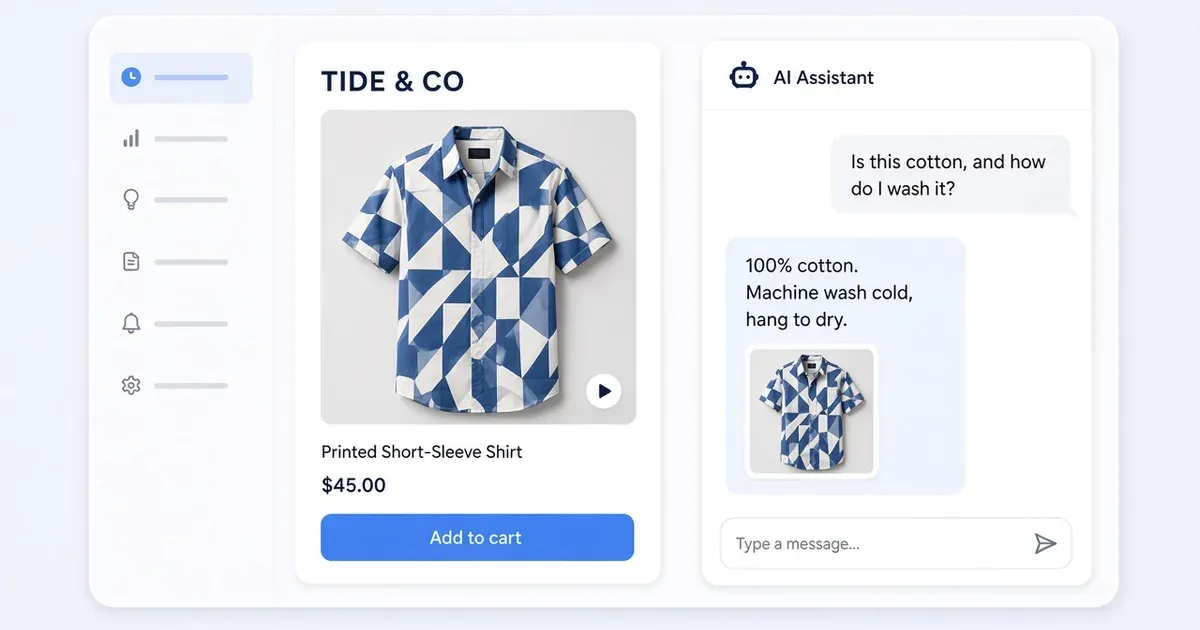
Launch an AI shopping assistant and test its first answer
A shopper on Eveni Pacific’s Classic Elei Shirt in Marine Magic asks, “Is this cotton, and how do I wash it?” The right answer is on the listing: 100% cotton, machine wash cold, hang to dry. That makes it the perfect first test. Classic Elei Shirt in Marine Magic
- Create the chat. Connect your Shopify catalog to Tolstoy and pick a product page whose copy holds a clear answer. In Widgets → All templates → Onsite AI → Shopper chat, create the widget and open its browser preview.
- Set the greeting and skills. Under Agent, set the greeting and review the enabled skills. If Top Questions is available, add a product-page question such as “How should I care for this?”
- Ask the question. On the shirt page, ask about material and care. The answer names the fabric and both care steps, and links to the same shirt.
- Go live. Publish, complete the Shopify embed step in your theme, and ask the same question from a phone in a fresh session. Shopper Chat setup and live checks
Help a shopper buy the right variant with an AI sales agent
On THE KRIPT’s Soline Top page, a shopper opens the matching Soline Skirt from a video and sees its size selector. The next question is natural: “Is the skirt available in my size?” That moment is where an agent turns a stock question into a cart. Soline Top · Soline Skirt
- Pick a test item. In a test store or preview cart, choose an item from your own catalog with one available and one sold-out variant. Note the variant names, prices and stock in Shopify right before the test.
- Turn on the commerce skills. In Customer Agent → Settings → Skills, review Inventory Check and enable Add to Cart.
- Ask, then buy. Ask “Is [product name] available in [sold-out size]?” The agent names the item and reports that size as sold out. Ask about an available size, then ask the agent to add one to the cart.
- Open the cart. It holds one of the requested variant at the current price. Repeat both requests in a fresh conversation, then offer the feature to shoppers. Commerce skills and inventory behavior
Test AI product recommendations against two real choices
“I have fine hair and want more volume” and “I have dry, coarse hair and want moisture” both sound like shampoo searches, but they lead to different products in amika’s catalog. Big Hit is made for fine to medium hair and volume. Hydro Rush is an intense-moisture shampoo for dry, textured or coarse hair. Two clear answers make a clear test. Big Hit Volumizing Shampoo · Hydro Rush Intense Moisture Shampoo
- Pick two products for one need. From your own catalog, choose two products that solve different versions of the same need. Note the attribute on each page that makes it the match. Add a retired item shoppers still ask for; amika names Big Hit as the successor to 3D shampoo. amika’s replacement guidance
- Sync and preview. Review Recommendation Engine and Inventory Check in the AI Shopper skills, sync descriptions, variants and availability, and open the Shopper Chat preview.
- Ask each question in a fresh chat. Each suggestion explains the attribute that makes it fit and links to the right product.
- Ask for the retired item. Try “I used to buy 3D shampoo. What replaced it?” The card leads to the current product. Save all three questions as checks for your next assortment change. AI Shopper settings
What to do
- Start with one product question your own listing answers word for word.
- Turn on Inventory Check and Add to Cart, and test a sold-out and an available size.
- Keep three test questions and rerun them after every catalog change.
Set it up on your own store
Start free, connect Shopify, and run this workflow on your own products. You approve every result before shoppers see it.
FAQ
What can an AI shopping assistant do on a Shopify store?
Tolstoy’s Shopper Chat answers product questions from your catalog, checks inventory, recommends products and, with the Add to Cart skill on, adds the variant a shopper asks for to the cart.
Where do I turn on inventory and add-to-cart answers?
In Customer Agent → Settings → Skills. Review Inventory Check and Recommendation Engine, and enable Add to Cart.
How do I know the answers are right before shoppers see them?
Test in the browser preview with questions whose answers are on your own product pages, such as material and care. Then repeat the same question on the live storefront from a phone.
Does Shopper Chat need a separate setup for each product?
No. The agent settings are shared across the store, and the chat reads the current product on each page.
Open it in Tolstoy
Connect your Shopify store and Tolstoy sets up this workflow with you, step by step.