Help shoppers choose without leaving the product page
Keep shoppers on the product page. Add a two-choice product finder that recommends the right item inline, built with a Tolstoy Custom JS Widget.
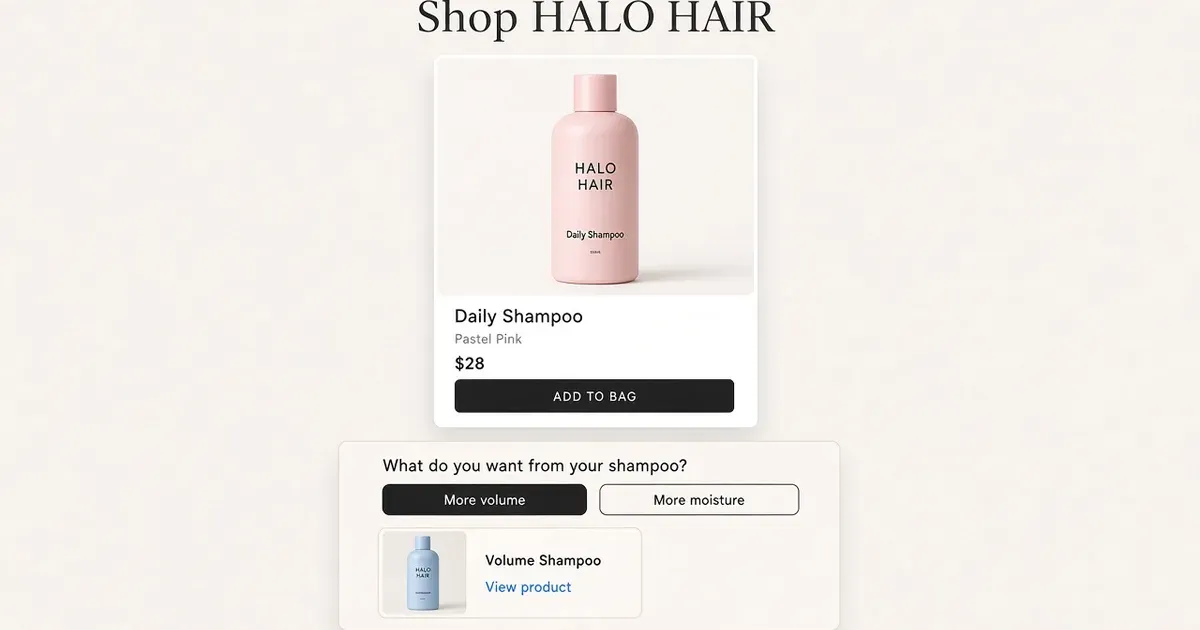
Answer the choice where the shopper already is
A shopper on a shampoo page needs help picking a formula. Send them to a quiz page and they lose their place. Put one compact question on the product page instead: it asks, recommends and links, while the add-to-cart button stays in reach. amika runs a full hair quiz for broader discovery; the two-choice finder below brings the same help onto a single product page. amika hair quiz
| Shopper choice | Expected result |
|---|---|
| More volume | Show Big Hit Volumizing Shampoo with its product link. |
| More moisture | Show Hydro Rush Intense Moisture Shampoo with its product link. |
| Close | Return keyboard focus to Help me choose. |
Build it in four steps
- Start the widget. In Widgets → All templates → Custom → Custom JS Widget, choose Create my own. Bring the approved answer for each choice, both product URLs and the product template where the finder belongs.
- Give the builder this brief. “Add a button labeled ‘Help me choose.’ When opened, ask ‘What do you want from your shampoo?’ Offer ‘More volume’ and ‘More moisture.’ For volume, show Big Hit Volumizing Shampoo with a link to its product page. For moisture, show Hydro Rush Intense Moisture Shampoo with its product link. Keep answers inline until the shopper chooses a link. Include ‘Start over’ and a close button that returns focus to ‘Help me choose.’” Add your real URLs. Big Hit · Hydro Rush
- Test it like a shopper. In Browser preview, select the Product page context. Try both choices, close and reopen the panel, and repeat on a phone-size screen and with a keyboard. Follow both links.
- Publish to a preview theme. Use Publish to get the installation instructions. Add the Tolstoy Builder block to the product template and paste the widget code. To show it on only some products, use a dedicated template assigned to them. Custom widget setup · Shopify template assignments
What to do
- Pick one decision shoppers get stuck on, with two clear answers.
- Keep the answer inline and the add-to-cart button in reach.
- Test both choices on a phone and with a keyboard, then publish.
Set it up on your own store
Start free, connect Shopify, and run this workflow on your own products. You approve every result before shoppers see it.
FAQ
Why put a product finder on the product page instead of a quiz page?
The shopper keeps their place. The question opens on the current page, the recommendation appears inline, and the add-to-cart control stays in reach.
What do I need before I build it?
The approved answer for each choice, the product URL for each recommendation, and the Shopify product template where the finder belongs.
Can I show the finder on only some products?
Yes. Create a dedicated product template, assign it to those products in Shopify, and add the Tolstoy Builder block only to that template.
How do I install it in my theme?
Publish the widget to get its installation instructions, add the Tolstoy Builder app block to the product template, and paste the widget code. Start in a Shopify preview theme.
Open it in Tolstoy
Connect your Shopify store and Tolstoy sets up this workflow with you, step by step.