Recommend the right size from your own size chart
Shopper Chat reads your size chart and recommends a size in the conversation. Test it with two real measurements: one clear match and one between sizes.
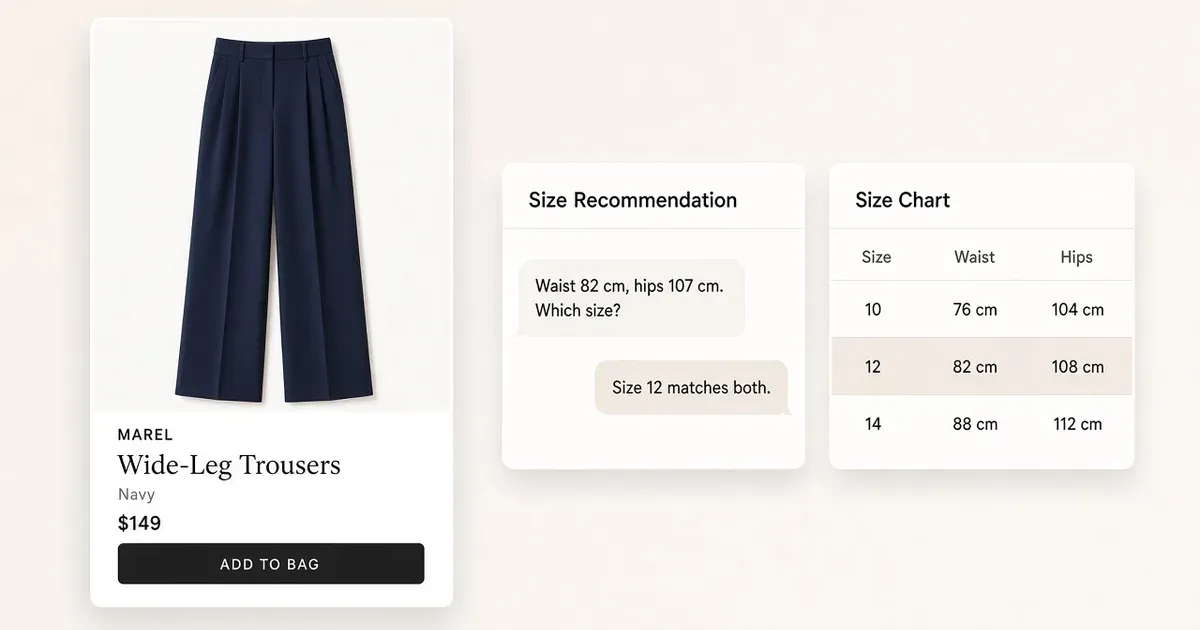
Two questions tell you if the assistant reads your chart
A shopper gives a waist of 82 cm and hips of 107 cm. In Fleur Collective’s Australian Pants & Skirts body-measurement chart, both fall in size 12. Change only the hips to 112 cm and the measurements span sizes 12 and 14. One clear match and one real fit trade-off: that is the whole test. Fleur Collective’s product size charts
| AU Pants & Skirts body measurements | Expected answer |
|---|---|
| Waist 82 cm, hips 107 cm | AU 12 for both measurements. |
| Waist 82 cm, hips 112 cm | The waist matches AU 12 and the hips match AU 14. The answer uses the garment’s fit notes or asks about fit preference before suggesting a size. |
New to Shopper Chat? Set it up first.
Set up and test sizing in four steps
- Give the agent the right chart. Pick one Shopify item and open the size guide it links to. Note the category, country, units and whether each number is a body or garment measurement. Make that chart and any product fit notes available to the agent.
- Turn on Sizing. In Customer Agent → Settings → Skills, enable Sizing and save.
- Ask both questions. On the product page, try “My waist is 82 cm and hips are 107 cm. Which AU size matches your pants chart?” The answer points to AU 12 and says why. In a fresh chat, try “My waist is 82 cm and my hips are 112 cm. What would you suggest?” The answer names both ranges and uses the fit guidance or asks how the shopper likes the fit.
- Check a second chart. Repeat a question on a product with a different chart. If an answer uses the wrong table, correct the linked chart and retest in a fresh session. Sizing skill and troubleshooting
Pair sizing with virtual try-on on the product page: try-on shows the look, sizing answers the fit.
What to do
- Use the size chart your product page already links to.
- Test one clear match and one between-sizes case before launch.
- Repeat on a second product with a different chart.
Set it up on your own store
Start free, connect Shopify, and run this workflow on your own products. You approve every result before shoppers see it.
FAQ
Where does the assistant get its size advice?
From the size chart and fit notes you make available for the product. Use the chart the product page actually links to, with its country, units and whether each number is a body or garment measurement.
How do I turn on size recommendations?
In Customer Agent → Settings → Skills, enable Sizing and save. Then test it in a product-page conversation in Shopper Chat.
What should the assistant say when measurements fall across two sizes?
It names both sizes, explains which measurement matches each, and uses the garment’s fit notes or asks about fit preference before it suggests one.
Do I need a different test for each size chart?
Test one product per chart. Repeat a question on a product with a different chart to confirm the assistant uses the right table.
Open it in Tolstoy
Connect your Shopify store and Tolstoy sets up this workflow with you, step by step.